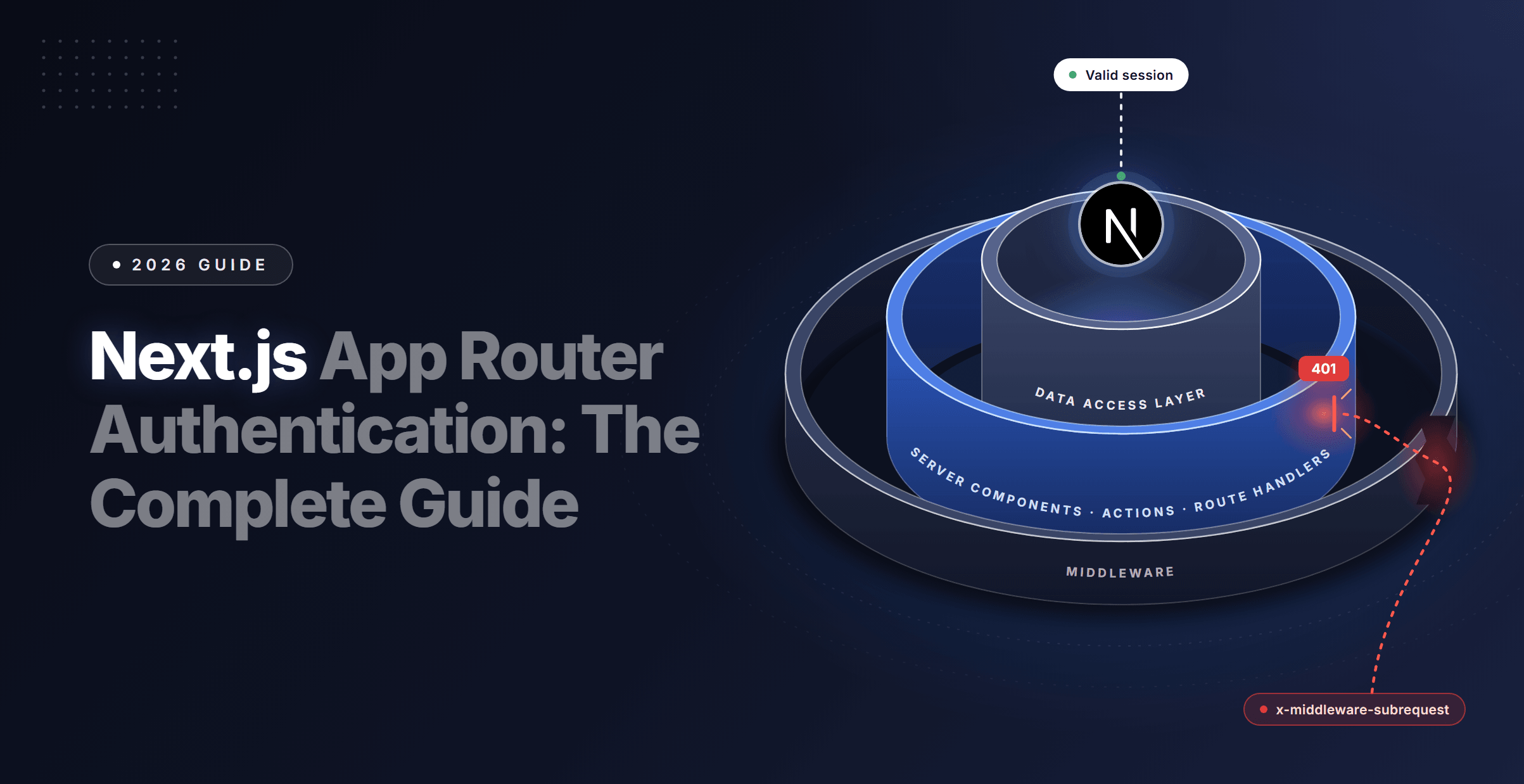

TL;DR
- Middleware, now called Proxy, is a fast first check, not a security boundary. CVE-2025-29927 let one request header skip it entirely, five more advisories in 2026 found other ways around it, and any path outside its matcher skips it too.
- Put every read and write behind a Data Access Layer (DAL). Each function checks the session against the database, so revoking a session or removing a role takes effect on the next request. Queries filter by the signed-in user, and only the fields the UI needs leave the module.
- Check inside every entry point, because each one is public. Pages call
verifySession()and redirect. Server Actions are POST endpoints, so they validate their input and go through the DAL. Route Handlers answer with401or403, never a redirect. - Pair short-lived access tokens with single-use refresh tokens. Keep both in
httpOnly,SameSitecookies, and refresh under a cross-tab lock so two tabs don’t look like token theft. - Streaming locks the status code at
200. It goes out with the first Suspense fallback or Cache Components shell, so a real307has to come before that, from Proxy or from a page check with nothing suspended above it. Anything in the static shell reaches every visitor Proxy lets through. - SuperTokens replaces the token code, not the architecture. The SuperTokens section swaps in its SDK for the session lookup, Proxy’s token check, and the refresh flow, and every check stays where it is.
Here’s the Next.js App Router authentication architecture this guide builds:
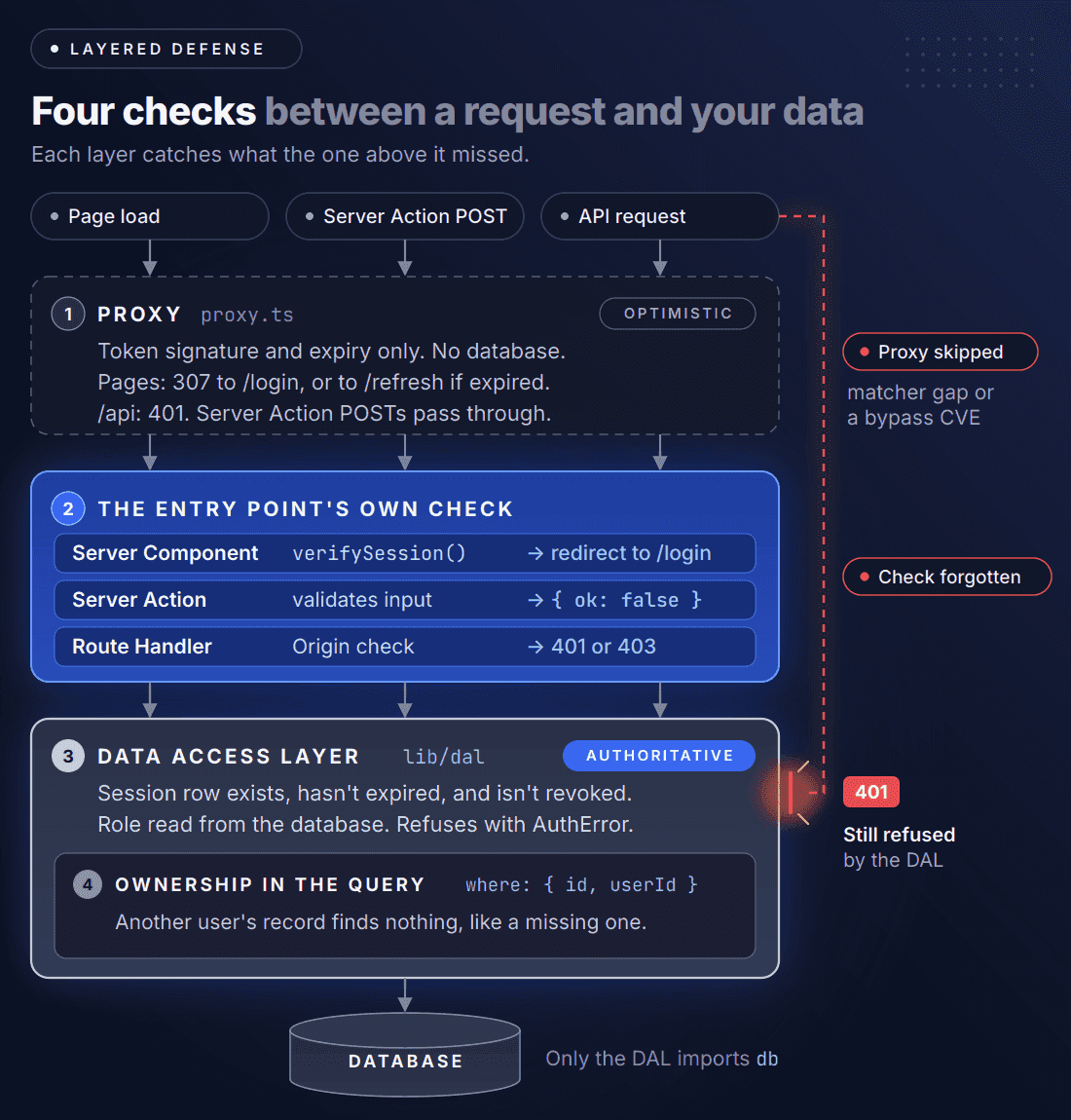
Table of Contents
- Why App Router Changes Authentication
- CVE-2025-29927: What the Middleware Bypass Actually Was
- Defense in Depth: The Data Access Layer Pattern
- Protecting Server Components
- Protecting Server Actions
- Protecting Route Handlers
- Middleware at the Edge: What It’s For and What It Isn’t
- Session and Token Strategy
- Streaming Auth with Suspense
- Implementing This with SuperTokens
- FAQ
Why App Router Changes Authentication
In March 2025, the Next.js team disclosed CVE-2025-29927, a critical (CVSS 9.1) authorization bypass in middleware. A request carrying one internal header, x-middleware-subrequest, set to the right value, skipped middleware entirely and went straight to the route behind it. Self-hosted apps from Next.js 11.1.4 onward were exposed until they upgraded to a fixed release.
For any app that checked sessions in middleware and nowhere else, that header turned every protected route into a public one. The bug was in Next.js. How much it exposed came down to architecture.
Middleware-only authentication is an easy design to fall into. One file sits in front of every route, runs before anything renders, and looks like a complete perimeter. It’s also a single point of failure, and the App Router gives that single point more ground to cover. In the Pages Router, server code lived in a short list of places, mainly getServerSideProps and API routes. The App Router spreads it across the component tree. That’s the real shift in Next.js App Router authentication: every place that runs server code needs its own check.
Where Auth Checks Run
Proxy runs first, but only where its matcher points. Next.js 16 renamed middleware.ts to proxy.ts without changing its job. It’s the fastest place to turn away a signed-out user and the easiest check to lose: a path outside the matcher skips it, and so does every Server Action called on that path.
Server Components fetch data while they render. Pages and layouts read cookies and query the database in the same function, with no API layer in between where a guard used to sit. A check at the top of a page protects that page’s output and nothing else, and a check in a layout doesn’t re-run on client-side navigation between the pages under it.
Server Actions are POST endpoints. Calling one sends a POST request to the current page with a Next-Action header that identifies the function. Anyone who can send that request can run the action, whether or not your UI shows the button. That’s why the Next.js authentication guide says to treat Server Actions like public-facing API endpoints. A page-level auth check doesn’t cover the actions defined on that page.
Route Handlers answer any client. A route.ts file is a plain HTTP endpoint. Mobile apps, webhooks, and other services call it directly, often with an Authorization header instead of a cookie, and no page or layout runs in front of it. The only check a Route Handler can count on is its own.
Why the Checks Drift Apart
Each of these runs at a different moment, has different control over the response, and needs to fail in a different way. A check that’s correct in one can be wrong in the next.
| Context | Triggered by | Can set cookies | Failure response |
|---|---|---|---|
| Proxy | Any request its matcher covers | Yes | Redirect pages to login, 401 for API paths |
| Server Component | Rendering a page or layout | No | redirect() to login, render nothing protected |
| Server Action | A POST with a Next-Action header |
Yes | Throw or return an error before touching data |
| Route Handler | Any HTTP request to its path | Yes | 401 or 403, not a redirect |
The last two columns are where shared helpers break. Server Components can’t set cookies, because HTTP can’t add them once a response starts streaming, so a page that finds an expired access token can’t refresh it in place. And a verifySession() helper that calls redirect('/login') is right for a page. In a Route Handler, the same helper answers a mobile client with a 307 redirect to an HTML login page instead of a 401 the client can act on.
The runtime split made this worse. Until Next.js 15.2, middleware could only run on the Edge runtime, which supports a subset of Node.js APIs and rules out most traditional database drivers. A common result was a JWT signature check in middleware and a database-backed check, or none, everywhere else. Those two checks can disagree. A signature check can’t see revocation, so a session you revoke after a password change keeps passing it until its access token expires.
Proxy runs on Node.js in Next.js 16, but the Next.js authentication guide still limits it to reading the cookie, with no database calls, because it runs on every matched route, prefetches included. That split, a fast optimistic check up front and an authoritative check behind it, is the design Next.js recommends. What you control is whether every request path reaches the authoritative one.
That’s the architecture this guide builds. Proxy stays as a fast first line that turns away signed-out users. A Data Access Layer becomes the one place every Server Component, Server Action, and Route Handler goes to read the session and touch data. A bypassed Proxy or a forgotten page check then doesn’t expose what’s behind it. The architecture sections stay provider-neutral, and the final section maps each layer onto SuperTokens.
CVE-2025-29927: What the Middleware Bypass Actually Was
Most write-ups stop at the header name. The mechanism is worth a few minutes, because it shows exactly which code held up and which didn’t.
How the Bypass Worked
Middleware can make its own fetch calls, including to routes in the same app. Without a guard, a middleware that fetches its own app would run again on that request, and again on the next one. Next.js prevented the loop with an internal header. Every request middleware sent out carried x-middleware-subrequest, a colon-separated list of the middleware that had already run. When a request arrived carrying it, Next.js knew middleware had been there and skipped running it again.
The flaw was in who it believed. Next.js read the header from every incoming request, including ones from the internet, and had no way to tell its own subrequests from a client that set the header itself. This is the check, trimmed, from Next.js 15.1.7:
// packages/next/src/server/web/sandbox/sandbox.ts (Next.js 15.1.7, comments added)
export const run = withTaggedErrors(async function runWithTaggedErrors(params) {
  const runtime = await getRuntimeContext(params)
  // Read straight from the incoming request, whoever sent it
  const subreq = params.request.headers[`x-middleware-subrequest`]
  const subrequests = typeof subreq === 'string' ? subreq.split(':') : []

  const MAX_RECURSION_DEPTH = 5
  const depth = subrequests.reduce(
    (acc, curr) => (curr === params.name ? acc + 1 : acc),
    0
  )

  if (depth >= MAX_RECURSION_DEPTH) {
    // Tell the router middleware finished, without ever running it
    return {
      waitUntil: Promise.resolve(),
      response: new runtime.context.Response(null, {
        headers: {
          'x-middleware-next': '1',
        },
      }),
    }
  }
  // ...the middleware function only runs past this point
params.name is the middleware’s module path, middleware or src/middleware. Once the header named it enough times, Next.js returned x-middleware-next: 1, the same signal a middleware sends when it calls NextResponse.next(). The middleware function never executed. Its redirects, rewrites, header changes, and Content Security Policy were all skipped, and the request went on to the page as if middleware had approved it.
The matching rule changed over the years. Before 12.2, middleware lived in pages/_middleware files. From 12.2 through 14.1, one match against the file name was enough to skip it, and 14.2 added the recursion counter above. Every version made the same mistake: it took the client’s word for it.
Affected Versions and the Fix
Security researchers Rachid and Yasser Allam reported the bug on February 27, 2025. Fixed releases shipped between March 17 and March 23, and the advisory went public on March 21.
| Release line | Vulnerable versions | Patched in |
|---|---|---|
| 15.x | 15.0.0 to 15.2.2 | 15.2.3 |
| 14.x | 14.0.0 to 14.2.24 | 14.2.25 |
| 13.x | 13.0.0 to 13.5.8 | 13.5.9 |
| 12.x | 12.0.0 to 12.3.4 | 12.3.5 |
| 11.x | 11.1.4 | None. Upgrade, or strip the header |
Self-hosted apps running next start or output: 'standalone' were exposed. Apps on Vercel, Netlify, and Cloudflare Workers weren’t, because routing on those platforms runs in a separate layer in front of the app, and static exports don’t run middleware at all. Vercel’s postmortem covers the timeline in detail.
The fix left the recursion check alone. It changed whether the header can be trusted. At startup, each Next.js server generates a random ID and attaches it to its own subrequests as x-middleware-subrequest-id. Before routing, any incoming request that doesn’t carry the matching ID has its x-middleware-subrequest header deleted:
// packages/next/src/server/lib/server-ipc/utils.ts (Next.js 15.2.3)
// If this request didn't origin from this session we filter
// out the "x-middleware-subrequest" header so we don't skip
// middleware incorrectly
if (
  header === 'x-middleware-subrequest' &&
  headers['x-middleware-subrequest-id'] !==
    (globalThis as any)[Symbol.for('@next/middleware-subrequest-id')]
) {
  delete headers['x-middleware-subrequest']
}
That fix needed one follow-up. CVE-2025-30218, published April 2, 2025, found that middleware sent the new ID with every outgoing fetch, including requests to third-party hosts, so the secret the fix depended on could end up on someone else’s server. The floor for both CVEs is 12.3.6, 13.5.10, 14.2.26, or 15.2.4.
If you’re stuck on an unpatched version, the advisory’s workaround is to stop external requests carrying x-middleware-subrequest from reaching Next.js. On nginx, that’s one line:
location / {
  # Never forward the internal header from outside traffic
  proxy_set_header x-middleware-subrequest "";
  proxy_pass http://127.0.0.1:3000;
}
It Wasn’t the Last Bypass
CVE-2025-29927 tends to get told as a one-off. It wasn’t. In May 2026, Next.js fixed four more ways to reach a protected route without middleware or Proxy running, and in July it fixed a fifth:
- CVE-2026-44575:
.rscand segment-prefetch variants of an App Router URL resolved to the same page without matching the middleware rule. Fixed in 15.5.16 and 16.2.5. - CVE-2026-45109: the fix for 44575 didn’t cover
middleware.tsbuilt with Turbopack. Fixed in 15.5.18 and 16.2.6. - CVE-2026-44574: crafted query parameters changed the dynamic route value a page saw while the path middleware matched stayed the same. Fixed in 15.5.16 and 16.2.5.
- CVE-2026-44573: in Pages Router apps with i18n, locale-less
/_next/datarequests skipped middleware and returned protected page data. Fixed in 15.5.16 and 16.2.5. - CVE-2026-64642: App Router apps built with Turbopack and a single configured locale could be reached around Proxy. Fixed in 16.2.11.
The four with published details share a shape: Proxy and the router read the same request differently. Vercel’s May 2026 release notes say those advisories “cannot be reliably blocked at the WAF layer” and call patching the only complete mitigation. The workaround the advisories give is consistent: enforce authorization in the page or route itself instead of relying on middleware alone.
The Pattern That Stayed Safe
Here’s the difference in code. A common middleware-only setup verifies the session in Proxy and forwards the user ID to pages in a request header:
// proxy.ts (middleware.ts before Next.js 16)
import { NextResponse, type NextRequest } from 'next/server'
import { decrypt } from '@/lib/session'

export async function proxy(request: NextRequest) {
  const session = await decrypt(request.cookies.get('session')?.value)
  if (!session?.userId) {
    return NextResponse.redirect(new URL('/login', request.url))
  }

  // Forward the verified user ID to the page
  const headers = new Headers(request.headers)
  headers.set('x-user-id', String(session.userId))
  return NextResponse.next({ request: { headers } })
}

export const config = {
  matcher: ['/dashboard/:path*'],
}
The page trusts that header:
// app/dashboard/invoices/page.tsx
// WRONG: assumes Proxy ran and set x-user-id
import { headers } from 'next/headers'
import { db } from '@/lib/db'
import { InvoiceList } from './invoice-list'

export default async function InvoicesPage() {
  const userId = (await headers()).get('x-user-id')!
  const invoices = await db.invoice.findMany({ where: { userId } })
  return <InvoiceList invoices={invoices} />
}
With the bypass, Proxy never runs, so the page reads whatever x-user-id the attacker sent. That’s worse than a skipped login check: anyone can read any user’s invoices by sending that user’s ID. Stripping client-sent copies of the header inside Proxy, which some examples do, doesn’t help, because the code doing the stripping is the code that didn’t run. The same thing happens on a fully patched app the day someone adds a route the matcher doesn’t cover.
The version that held up checks the session where the data is read:
// app/dashboard/invoices/page.tsx
// CORRECT: verifies the session itself, whether or not Proxy ran
import { verifySession } from '@/lib/dal'
import { db } from '@/lib/db'
import { InvoiceList } from './invoice-list'

export default async function InvoicesPage() {
  // Redirects to /login when the session cookie is missing or invalid
  const { userId } = await verifySession()
  const invoices = await db.invoice.findMany({ where: { userId } })
  return <InvoiceList invoices={invoices} />
}
Under the same bypass, this page redirects to /login. Three things changed:
- The session check runs where the data is read, so it holds no matter how the request arrived.
- The user ID comes from the verified session, never from a request header.
- Proxy keeps its job as a fast redirect for signed-out users. It just stops being the only thing between a request and the database.
The next section builds verifySession() out into a full Data Access Layer.
You can test for this whole class of bug without reproducing any CVE. In a test environment, remove a protected route from your Proxy matcher, then load the page and call its Server Actions and Route Handlers directly. If anything protected comes back, a Proxy bypass would hand it out too.
A bug in Proxy should cost you a redirect, not your users’ data.
Defense in Depth: The Data Access Layer Pattern
The fixed page at the end of the last section still had one weak spot. It queried the database itself, and it was safe only because someone remembered to call verifySession() first. The next page someone writes might not.
A Data Access Layer (DAL) removes the need to remember. It’s a server-only module that owns every read and write, and every function in it checks the session before it touches data. Pages, Server Actions, and Route Handlers call the DAL instead of the database, so a check that’s missing at the edge doesn’t turn into a leak. The Next.js team recommends this pattern for new projects. This section builds the full module.
The Rules
- Only the DAL touches the database. Pages and actions import functions like
getMyInvoices(), never the database client. - Every exported function checks the session itself. No function assumes its caller already did.
- Ownership lives in the query. Reads and writes filter by the signed-in user’s ID, so a guessed or leaked record ID finds nothing.
- Only DTOs leave. Functions return the fields the UI needs and nothing else, because anything a Server Component passes to a Client Component is serialized into the payload the browser downloads.
- The DAL decides, the caller responds. The DAL throws a typed error, and each context turns it into the right response: a redirect, an error result, or a
401.
The Session Module
The examples assume sign-in created a row in a session table and set a signed cookie carrying that row’s ID. The session strategy section covers that side. They use a Prisma-style client, but the structure doesn’t depend on the ORM.
// lib/dal/session.ts
import 'server-only'
import { cache } from 'react'
import { cookies } from 'next/headers'
import { redirect } from 'next/navigation'
import { jwtVerify } from 'jose'
import { db } from '@/lib/db'

export type Session = {
  sessionId: string
  userId: string
  role: 'member' | 'admin'
}

export class AuthError extends Error {
  constructor(readonly status: 401 | 403) {
    super(status === 401 ? 'Authentication required' : 'Not allowed')
    this.name = 'AuthError'
  }
}

function signingKey() {
  const secret = process.env.SESSION_SECRET
  if (!secret) throw new Error('SESSION_SECRET is not set')
  return new TextEncoder().encode(secret)
}

// The only provider-specific code in the DAL. Swap this body for your auth library.
async function readSession(): Promise<Session | null> {
  const token = (await cookies()).get('session')?.value
  if (!token) return null

  let sessionId: string
  try {
    const { payload } = await jwtVerify(token, signingKey(), { algorithms: ['HS256'] })
    if (typeof payload.sid !== 'string') return null
    sessionId = payload.sid
  } catch {
    return null // bad signature, expired token, or malformed cookie
  }

  // The signature proves we issued the cookie. The database proves it still counts.
  const record = await db.session.findUnique({
    where: { id: sessionId },
    select: { userId: true, expiresAt: true, revokedAt: true, user: { select: { role: true } } },
  })
  if (!record || record.revokedAt || record.expiresAt <= new Date()) return null

  return { sessionId, userId: record.userId, role: record.user.role }
}

// Deduplicated within a render, so ten components cost one lookup
export const getSession = cache(readSession)

// Pages and layouts: send signed-out users to the login page
export async function verifySession(): Promise<Session> {
  const session = await getSession()
  if (!session) redirect('/login')
  return session
}

// Data functions: fail closed with a status the caller can translate
export async function requireSession(): Promise<Session> {
  const session = await getSession()
  if (!session) throw new AuthError(401)
  return session
}

export async function requireRole(role: Session['role']): Promise<Session> {
  const session = await requireSession()
  if (session.role !== role) throw new AuthError(403)
  return session
}
Key implementation decisions:
readSession()is the authoritative check. A valid signature isn’t enough. The session row has to exist, be unexpired, and not be revoked, so signing out everywhere or banning a user takes effect on the next request. Proxy keeps its cheap signature-only check for redirects.- The role comes from the database, not the token. A demoted admin loses access on their next request instead of whenever a token happens to expire.
- Only token problems mean “signed out.” A database outage throws and surfaces as a 500 instead of quietly logging everyone out.
cache()only dedupes within a render. A page that makes ten DAL calls does one session lookup. Server Actions and Route Handlers aren’t part of a render pass, so each DAL call there runs its own lookup.
The four exported helpers differ only in what happens when there’s no valid session:
| Function | With no valid session | Use it in |
|---|---|---|
getSession() |
Returns null |
UI that branches, like a header with a “Sign in” link |
verifySession() |
Redirects to /login |
Pages and layouts |
requireSession() |
Throws AuthError(401) |
DAL data functions |
requireRole() |
Throws AuthError(401) or AuthError(403) |
DAL functions that need a role |
The Data Functions
// lib/dal/invoices.ts
import 'server-only'
import { db } from '@/lib/db'
import { requireRole, requireSession } from './session'

// The only invoice fields that ever leave the DAL
const invoiceFields = {
  id: true,
  number: true,
  amountCents: true,
  status: true,
  dueDate: true,
} as const

export type InvoiceDTO = {
  id: string
  number: string
  amountCents: number
  status: 'draft' | 'sent' | 'paid'
  dueDate: Date
}

export async function getMyInvoices(): Promise<InvoiceDTO[]> {
  const { userId } = await requireSession()
  return db.invoice.findMany({
    where: { userId },
    select: invoiceFields,
    orderBy: { dueDate: 'desc' },
  })
}

export async function getInvoice(invoiceId: string): Promise<InvoiceDTO | null> {
  const { userId } = await requireSession()
  // Ownership lives in the query, so another user's invoice ID finds nothing
  return db.invoice.findFirst({
    where: { id: invoiceId, userId },
    select: invoiceFields,
  })
}

export async function markInvoicePaid(invoiceId: string): Promise<boolean> {
  const { userId } = await requireSession()
  const { count } = await db.invoice.updateMany({
    where: { id: invoiceId, userId, status: 'sent' },
    data: { status: 'paid' },
  })
  return count === 1
}

export async function getOverdueInvoices(): Promise<InvoiceDTO[]> {
  await requireRole('admin')
  return db.invoice.findMany({
    where: { status: 'sent', dueDate: { lt: new Date() } },
    select: invoiceFields,
  })
}
// lib/dal/index.ts
export { AuthError, getSession, verifySession, type Session } from './session'
export { getInvoice, getMyInvoices, getOverdueInvoices, markInvoicePaid } from './invoices'invoiceFields is the DTO in practice: an allowlist of columns. Adding a stripeCustomerId or internalNotes column later doesn’t quietly ship it to the browser. getInvoice() returns null for an invoice that belongs to someone else, which tells a curious user nothing about whether it exists. And requireSession() and requireRole() stay out of the index file, so app code can only reach data through a function that already checks.
Calling the DAL from Every Context
The same functions work in all three server contexts. What changes is how each one responds to an AuthError.
// app/dashboard/invoices/page.tsx
import { getMyInvoices, verifySession } from '@/lib/dal'
import { InvoiceList } from './invoice-list'

export default async function InvoicesPage() {
  await verifySession() // signed-out users get a redirect, not an error page
  const invoices = await getMyInvoices() // checks again, using the cached lookup
  return <InvoiceList invoices={invoices} />
}
Note: If Cache Components is on (the default for new apps since Next.js 16.4), this page needs a Suspense boundary to build. The next section shows how.
// app/dashboard/invoices/actions.ts
'use server'

import { revalidatePath } from 'next/cache'
import { AuthError, markInvoicePaid } from '@/lib/dal'

export async function markPaid(invoiceId: unknown) {
  // Arguments come from the client, whatever the call site's types say
  if (typeof invoiceId !== 'string') return { ok: false, error: 'Invalid invoice' }

  try {
    const updated = await markInvoicePaid(invoiceId)
    if (!updated) return { ok: false, error: 'Invoice not found' }
  } catch (error) {
    if (error instanceof AuthError) return { ok: false, error: error.message }
    throw error
  }

  revalidatePath('/dashboard/invoices')
  return { ok: true }
}
// app/api/invoices/route.ts
import { AuthError, getMyInvoices } from '@/lib/dal'
export async function GET() {
try {
return Response.json(await getMyInvoices())
} catch (error) {
if (error instanceof AuthError) {
return Response.json({ error: error.message }, { status: error.status })
}
throw error
}
}The page redirects, the action returns a result the form can display, and the Route Handler answers with a 401 instead of the 307 redirect from the first section. The allow-or-deny decision happens once, in the DAL, and none of the three call sites can skip it. The sections on each context go deeper, including bearer tokens for Route Handlers that mobile clients call.
If you’ve turned on the experimental authInterrupts flag, unauthorized() and forbidden() from next/navigation can replace AuthError in pages and Route Handlers. A typed error works today, without a flag.
Keeping the DAL the Only Way In
Two guards turn the rules into build errors. The first is import 'server-only' at the top of every DAL file, which fails the build if a Client Component imports it (install it with npm install server-only). The second is a lint rule that stops app code from importing the database client directly:
// eslint.config.mjs
export default [
  // ...your existing config
  {
    files: ['app/**/*.{ts,tsx}'],
    rules: {
      'no-restricted-imports': ['error', {
        patterns: [{
          group: ['@/lib/db', '**/lib/db'],
          message: 'Read and write data through @/lib/dal so every query checks the session.',
        }],
      }],
    },
  },
]
With that rule on, the fixed page from the last section fails lint, because it imports db directly. That’s the point. It was safe only as long as everyone remembered the check.
A request for invoice data now passes four checks. Proxy turns signed-out users away early. The page redirects anyone Proxy missed. The DAL refuses anyone the page missed. The ownership filter refuses requests for someone else’s invoices. Proxy or the page can fail and the worst outcome is a confusing error page. The DAL is the layer that can’t fail, which is why every function in it checks for itself and why it’s the only code allowed near the database.
Proxy decides where a request goes. The DAL decides what it gets.
Protecting Server Components
Server Components are where the DAL gets called most, so most of the protection is already in place. What’s left is timing. “Redirect before anything renders” only holds under specific conditions in Next.js 16, and those conditions changed when Next.js 16.4 turned Cache Components on for every new app.
The Baseline: Check, Then Fetch
// app/dashboard/invoices/[id]/page.tsx
import { notFound } from 'next/navigation'
import { getInvoice, verifySession } from '@/lib/dal'
import { InvoiceDetail } from './invoice-detail'

export default async function InvoicePage({ params }: { params: Promise<{ id: string }> }) {
  await verifySession() // first, before any data or JSX
  const { id } = await params
  const invoice = await getInvoice(id) // null when it isn't this user's invoice
  if (!invoice) notFound()
  return <InvoiceDetail invoice={invoice} />
}
Without Cache Components, and with no loading.js above it, nothing streams until this function returns. A signed-out request gets a real 307 to /login, and another user’s invoice ID gets a real 404. Two habits keep it that way:
- Keep
verifySession()out oftry/catch.redirect()andnotFound()work by throwing, and a catch block swallows them. If you have to catch around them, rethrow withunstable_rethrow. - Route
generateMetadatathrough the DAL too. It runs alongside the page, not after it, so a title built from a direct database query is one more unchecked read.
When a Redirect Stops Being a Redirect
The status code is fixed the moment the response starts streaming, and streaming starts as soon as a Suspense fallback renders, including the one loading.js wraps around a page. Add a loading.tsx next to the page above and a signed-out request gets a 200: the loading UI first, then a <meta http-equiv="refresh"> tag and a client-side redirect to /login. notFound(), forbidden(), and unauthorized() downgrade the same way, to a 200 with a noindex tag.
The data stays protected either way, because the component that reads it never renders. What changes is the status code that monitoring, crawlers, and non-browser clients see.
Cache Components Move Every Check Behind Suspense
New apps from create-next-app 16.4 have Cache Components on, and it becomes the default for everyone in Next.js 17. With it on, reading cookies() outside a Suspense boundary is a build error. The baseline page above, and the invoices page from the DAL section, both fail next build with “Next.js encountered uncached or runtime data during prerendering.”
The fix is to move the check and the data into a component inside a boundary:
// app/dashboard/invoices/[id]/page.tsx (Cache Components on)
import { Suspense } from 'react'
import { notFound } from 'next/navigation'
import { getInvoice, verifySession } from '@/lib/dal'
import { InvoiceDetail } from './invoice-detail'

export default function InvoicePage({ params }: { params: Promise<{ id: string }> }) {
  return (
    <main>
      <Suspense fallback={<p>Loading invoice…</p>}>
        <Invoice params={params} />
      </Suspense>
    </main>
  )
}

async function Invoice({ params }: { params: Promise<{ id: string }> }) {
  await verifySession()
  const { id } = await params
  const invoice = await getInvoice(id)
  if (!invoice) notFound()
  return <InvoiceDetail invoice={invoice} />
}
That turns every Server Component check into a post-streaming check, with the 200 behavior described above. The build error also suggests export const instant = false, and that compiles, but the response to a signed-out visitor was still a 200, with the redirect carried in the RSC payload. With Cache Components on, Proxy is the only layer that runs before the shell is sent, which makes it the only place that can still return a real 307.
The Static Shell Is Public
With Cache Components, everything outside a Suspense boundary is prerendered into the static shell and served to every visitor before any check runs. That includes components marked 'use cache'. A cached “members only” announcement placed above the gated section reached signed-out visitors right along with their redirect.
If a signed-out visitor shouldn’t see it, it goes behind the boundary and through the DAL, or the route gets a Proxy check. The Next.js authentication guide gives the same advice for static content shared between users: protect it with Proxy.
Layouts Don’t Guard Pages
Layouts don’t re-render on client-side navigation, so a check in a layout runs once for a whole section of the app, not on every page view. The Next.js docs add a second problem: a layout doesn’t control whether the route below it renders. Pages and parallel route slots render on their own, and their output still lands in the RSC payload.
That’s easy to underestimate, so here’s what it looks like with Cache Components off. A layout that calls verifySession() returned a 307 for signed-out requests, and the body of that 307 still contained the page’s rendered output, just ahead of the redirect marker. Browsers follow the redirect and never show it. curl shows it fine. A layout that rendered “Please sign in” in place of {children} returned a 200 with the page’s output in the payload. In both cases the page function ran.
Use layouts for shared UI that reads the session through getSession(), like a header with the user’s name, and keep the check in every page, through the DAL.
Expired Access Tokens
Server Components can’t set cookies, so if your sessions use short-lived access tokens, a page that finds an expired one can’t refresh it in place. Redirecting to /login at that point signs out someone whose refresh token is still valid, and if your login page sends signed-in users back where they came from, it can start a loop. Render a small Client Component instead, one that calls your refresh endpoint and then router.refresh(). The session strategy section builds the endpoint, and the SuperTokens section shows the SDK’s version.
What Signed-Out Visitors Actually Get
Here’s what a test app on Next.js 16.4.2 returned for a signed-out request, depending on where the check ran:
| Where the check runs | Response | Status |
|---|---|---|
| Proxy | Redirect before anything renders | 307 |
| Page, no Suspense above it (Cache Components off) | Redirect before anything streams | 307 |
Page under loading.js or inside <Suspense> |
Loading UI, then a client-side redirect | 200 |
| Any Server Component, Cache Components on | Static shell, then a client-side redirect | 200 |
| Layout only (Cache Components off) | Redirect, with the page’s output in the body | 307 |
Layout that swaps {children} for a sign-in prompt |
Prompt, with the page’s output in the payload | 200 |
Check in the page, fetch through the DAL, and let Proxy own the status code.
Protecting Server Actions
A Server Action reads like a function call, which makes it easy to forget that it’s also a public endpoint. The Next.js docs put it bluntly: “Treat every action as an untrusted entry point.”
What a Call Looks Like
Here’s the request behind markPaid('inv_1') from the DAL section:
POST /dashboard/invoices HTTP/1.1
Next-Action: 7f3a9c0e…
Content-Type: text/plain;charset=UTF-8
Cookie: session=…

["inv_1"]
The URL is whatever page the user is on, the Next-Action header names the function, and the body carries its arguments. Next.js encrypts action IDs, rotates them over time, and strips unused actions from client bundles, but an ID isn’t a secret. Any action your UI can call has its ID somewhere in what the browser downloads. CVE-2026-64643, patched in July 2026, went further: IDs for actions used on signed-in pages could be read from static chunks served to anyone. Its workaround is the rule for this whole section: “Always authenticate within the boundary,” meaning inside the 'use server' function itself.
Proxy Coverage Doesn’t Follow the Action
Proxy matches URLs, and an action doesn’t have one of its own. When the POST lands on a path the matcher covers, Proxy runs and can turn it away. The Proxy docs spell out the catch: “a Proxy matcher that excludes a path will also skip Server Function calls on that path,” and “a refactor that moves a Server Function to a different route can silently remove Proxy coverage.”
A shared file can do the same without moving anything. Here’s a pattern that looks safe:
// app/actions.ts
'use server'

import { db } from '@/lib/db'

export async function likePost(formData: FormData) {
  // used by a form on the public blog page
}

// WRONG: "only the admin page renders this form, and Proxy guards /admin"
export async function deleteInvoice(formData: FormData) {
  await db.invoice.deleteMany({ where: { id: String(formData.get('invoiceId')) } })
}
In a test app on Next.js 16.4.2, the public blog page and an admin page both imported this file into Server Component forms. Next.js registered every action in the file for both pages, so a POST to the blog page carrying deleteInvoice’s ID ran the delete, with no session cookie at all. Proxy’s /admin rule never saw the request, because the request never went to /admin. When Client Components imported the same actions instead, Next.js routed the call to the admin page, where Proxy blocked it. That’s an implementation detail, not a security boundary. Don’t build on it.
The lint rule from the DAL section already flags this file, because it imports the database directly.
The Auth Check Inside Every Action
The fix puts the check where the write happens. Add an admin-only delete to the DAL and export it from lib/dal/index.ts:
// lib/dal/invoices.ts
// Admins can delete any invoice, so there's no owner filter, which makes the role check mandatory
export async function deleteInvoice(invoiceId: string): Promise<boolean> {
  await requireRole('admin')
  const { count } = await db.invoice.deleteMany({ where: { id: invoiceId } })
  return count === 1
}
Then keep the action thin. It validates, calls the DAL, and shapes the result:
// app/admin/invoices/actions.ts
'use server'

import { z } from 'zod'
import { revalidatePath } from 'next/cache'
import { AuthError, deleteInvoice } from '@/lib/dal'

export type ActionResult = { ok: true } | { ok: false; error: string } | null

const DeleteInvoiceInput = z.object({
  invoiceId: z.string().min(1).max(64),
})

export async function deleteInvoiceAction(_prev: ActionResult, formData: FormData): Promise<ActionResult> {
  // Form fields are whatever the client sent, hidden inputs included
  const input = DeleteInvoiceInput.safeParse({ invoiceId: formData.get('invoiceId') })
  if (!input.success) return { ok: false, error: 'Invalid invoice' }

  try {
    // The role check lives in the DAL, so it runs on every call, from any page
    const deleted = await deleteInvoice(input.data.invoiceId)
    if (!deleted) return { ok: false, error: 'Invoice not found' }
  } catch (error) {
    if (error instanceof AuthError) return { ok: false, error: error.message }
    throw error
  }

  revalidatePath('/admin/invoices')
  return { ok: true }
}
// app/admin/invoices/delete-invoice-button.tsx
'use client'
import { useActionState } from 'react'
import { deleteInvoiceAction } from './actions'
export function DeleteInvoiceButton({ invoiceId }: { invoiceId: string }) {
const [state, formAction, pending] = useActionState(deleteInvoiceAction, null)
return (
<form action={formAction}>
<input type="hidden" name="invoiceId" value={invoiceId} />
<button disabled={pending}>Delete invoice</button>
{state && !state.ok && <p role="alert">{state.error}</p>}
</form>
)
}In the shared file from the test, an action calling the same DAL function refused the request through the public blog page: “Not allowed” for a signed-in member and “Authentication required” with no cookie. An admin on the admin page could still delete. Every action needs the same three steps:
- Validate first. Arguments, form fields, and hidden inputs are whatever the client sent. TypeScript types don’t exist at runtime, and a schema checks shape, not ownership.
- Authorize through the DAL. The check runs in the action’s own call path, never in the page that rendered the form. The Next.js guide is explicit that render-time gating “is not a security boundary, because requests can be sent without going through the UI.”
- Return only what the UI renders. Return values are serialized to the browser, so send back
{ ok, error }, not database rows or raw error messages.
Bound Arguments Are Input Too
The Forms guide uses .bind() to pass an action extra arguments, like an ID, and contrasts it with a hidden input, whose value “will not be encoded.” That makes .bind() sound safer than it is. Next.js encrypts variables an inline action captures from its scope, but bound arguments are only encoded: in the test app, a bound invoice ID showed up in the page’s HTML as a readable hidden field, and anyone can change it before the request goes out.
Treat bound arguments like any other input. The markPaid action from the DAL section takes its invoice ID as an argument and already does: it checks the type, and the DAL’s ownership filter means a swapped ID finds nothing. If you run more than one instance, set NEXT_SERVER_ACTIONS_ENCRYPTION_KEY to one stable key so every instance can decrypt what another encrypted.
CSRF and Patching
Next.js only accepts actions as POST requests and compares the Origin header with the Host. A cross-site Origin got “Invalid Server Actions request” in the test app. If a reverse proxy or CDN serves your app from another domain, add that domain to experimental.serverActions.allowedOrigins. Cookies add a second layer: browsers don’t send SameSite=Lax or Strict cookies with a cross-site POST, so a forged action arrives signed out and the check inside the action refuses it. The session strategy section sets those attributes.
Both layers matter, because the framework’s checks have needed fixes of their own. CVE-2026-27978 treated Origin: null, which browsers send from opaque contexts like sandboxed iframes, as a missing origin and skipped the check until 16.1.7. React2Shell (CVE-2025-55182), disclosed in December 2025 and rated CVSS 10.0, was worse: a crafted request to a Server Function endpoint could run code on the server while React decoded the payload, before any check inside the action ran. Keeping Next.js and React patched is part of protecting actions.
The form is UI. The action is an endpoint. Check it like one.
Protecting Route Handlers
A Route Handler is an HTTP endpoint with no page attached, and the Next.js docs describe it in two sentences: “Route Handlers are public HTTP endpoints. Any client can access them.” Many of those clients are mobile apps, scripts, and other services, and none of them read error pages. They read status codes. Protecting a Route Handler means refusing the request with the right one.
What a Redirect Does to an API Client
The DAL’s verifySession() is built for pages. It redirects when there’s no session, and in a Route Handler that redirect is all the caller gets:
// app/api/account/route.ts
import { verifySession } from '@/lib/dal'

// WRONG: verifySession() redirects when there's no session, so this 401 never runs
export async function GET() {
  const session = await verifySession()
  if (!session) return new Response(null, { status: 401 })
  return Response.json({ userId: session.userId })
}
The Route Handler example in the Next.js authentication guide has the same shape. Its verifySession() calls redirect('/login') when the session is missing or invalid, so the 401 branch after it never runs.
On Next.js 16.4.2, a signed-out curl request to the handler above got a 307 to /login with an empty body. fetch() follows redirects by default, so a client using it never saw the 307. It got a 200 with the login page’s HTML, and res.json() threw SyntaxError: Unexpected token '<'. That’s a strange way to find out you’re signed out. A POST did worse: a 307 keeps the method and body, so fetch() re-sent the POST to /login and got a 405.
Proxy causes the same failure when its matcher covers /api and it answers with a redirect. When Proxy turns away an API request, it should return the 401 itself, the way the Proxy docs’ example does. In an app built from the authentication guide, the question never comes up: its Proxy example excludes api from the matcher, so Route Handlers under /api get no Proxy check at all.
401, 403, or 404
Each refusal tells the client something different, and well-behaved clients act on the difference:
| Status | Means | The client should | Example |
|---|---|---|---|
401 |
No valid credentials | Refresh its token or sign in, then retry | No session, or a revoked one |
403 |
Signed in, but not allowed | Stop retrying with the same credentials | A member calling an admin endpoint |
404 |
Not found, or not yours | Treat the resource as missing | Another user’s invoice |
RFC 9110 adds two rules that are easy to miss. A server sending a 401 “MUST send a WWW-Authenticate header field” naming at least one way to authenticate. And a server that wants to hide a resource from someone who can’t access it “MAY instead respond with a status code of 404”. The DAL makes that one free: its ownership filter returns nothing for another user’s invoice, so the handler can’t tell it apart from one that doesn’t exist.
Bearer Tokens for Non-Browser Clients
Mobile apps and CLIs usually send an Authorization: Bearer header instead of a cookie. The DAL needs one small change to accept both:
// lib/dal/session.ts
import { cookies, headers } from 'next/headers'

// Browsers never attach a bearer token on their own, which matters for CSRF later
export function bearerToken(requestHeaders: Pick<Headers, 'get'>): string | undefined {
  return requestHeaders.get('authorization')?.match(/^Bearer\s+(\S+)$/i)?.[1]
}

// The only provider-specific code in the DAL. Swap this body for your auth library.
async function readSession(): Promise<Session | null> {
  // Mobile apps and CLIs send the same token in an Authorization header
  const token = bearerToken(await headers()) ?? (await cookies()).get('session')?.value
  if (!token) return null

  // ...unchanged from here: verify the signature, then check the session row
}
Export bearerToken from lib/dal/index.ts too, since the wrapper below uses it. The bearer token is the same signed token the cookie carries, so the database check, revocation, and roles work the same way for both. The session strategy section covers how an app gets that token and refreshes it.
One Wrapper for Every Handler
Every handler needs the same three things on top of the DAL: refusals turned into status codes, a CSRF check for cookie-authenticated writes, and a cache header for per-user responses. Server Actions get an Origin check from Next.js. Route Handlers don’t, and the Next.js security post says so plainly: in Route Handlers, “CSRF protection has to be done manually.”
// lib/api/handler.ts
import 'server-only'
import { AuthError, bearerToken } from '@/lib/dal'

type Handler<Ctx> = (request: Request, context: Ctx) => Promise<Response>

// Server Actions get this check from Next.js. Route Handlers don't.
function isCrossSiteCookieWrite(request: Request): boolean {
  if (['GET', 'HEAD', 'OPTIONS'].includes(request.method)) return false
  if (bearerToken(request.headers)) return false // a cross-site page can't attach the user's token
  const origin = request.headers.get('origin')
  if (origin === null) return false // not a browser: browsers send Origin on every write
  if (!URL.canParse(origin)) return true // includes 'null' from sandboxed iframes
  const host = request.headers.get('x-forwarded-host') ?? request.headers.get('host')
  return new URL(origin).host !== host
}

export function apiHandler<Ctx>(handler: Handler<Ctx>): Handler<Ctx> {
  return async (request, context) => {
    if (isCrossSiteCookieWrite(request)) {
      return Response.json({ error: 'Cross-site request' }, { status: 403 })
    }

    let response: Response
    try {
      response = await handler(request, context)
    } catch (error) {
      if (!(error instanceof AuthError)) throw error // a database outage stays a 500
      // RFC 9110 requires a challenge on every 401. RFC 6750 defines this one.
      const challenge = bearerToken(request.headers) ? 'Bearer error="invalid_token"' : 'Bearer'
      return Response.json(
        { error: error.message },
        { status: error.status, headers: error.status === 401 ? { 'WWW-Authenticate': challenge } : {} },
      )
    }

    // Next.js sets no Cache-Control on dynamic Route Handler responses, and these carry per-user data
    if (response.headers.has('Cache-Control')) return response
    const uncached = new Response(response.body, response) // a fetched Response has read-only headers
    uncached.headers.set('Cache-Control', 'private, no-store')
    return uncached
  }
}
Here’s how the invoice endpoints use it:
// app/api/invoices/[id]/route.ts
import { z } from 'zod'
import { getInvoice, markInvoicePaid } from '@/lib/dal'
import { apiHandler } from '@/lib/api/handler'

type Context = { params: Promise<{ id: string }> }

export const GET = apiHandler(async (_request, { params }: Context) => {
  const invoice = await getInvoice((await params).id)
  // Someone else's invoice gets the same 404 as one that doesn't exist
  if (!invoice) return Response.json({ error: 'Invoice not found' }, { status: 404 })
  return Response.json(invoice)
})

const PatchBody = z.object({ status: z.literal('paid') })

// Each exported method is its own endpoint, so PATCH goes through the DAL too
export const PATCH = apiHandler(async (request, { params }: Context) => {
  const body = PatchBody.safeParse(await request.json().catch(() => null))
  if (!body.success) return Response.json({ error: 'Invalid body' }, { status: 400 })

  const updated = await markInvoicePaid((await params).id)
  if (!updated) return Response.json({ error: 'Invoice not found' }, { status: 404 })
  return new Response(null, { status: 204 })
})
// app/api/admin/overdue/route.ts
import { getOverdueInvoices } from '@/lib/dal'
import { apiHandler } from '@/lib/api/handler'
// requireRole('admin') inside the DAL: 401 when signed out, 403 for members
export const GET = apiHandler(async () => Response.json(await getOverdueInvoices()))Key implementation decisions:
- The wrapper doesn’t authenticate anything. The DAL does, inside
getInvoice()andmarkInvoicePaid(). The wrapper only translates its refusals. Anything else still throws, so a database outage stays a 500 instead of becoming a 401 that sends clients into a sign-in loop. - Every 401 tells the client what to send. Callers without a bearer token get
WWW-Authenticate: Bearer. A bearer caller whose token failed getserror="invalid_token", which RFC 6750 uses for a token that’s “expired, revoked, malformed, or invalid for other reasons.” That’s the client’s cue to refresh once and retry. - The CSRF check only runs when a cookie is the credential. Browsers attach cookies automatically, which is what CSRF exploits, but they never attach a bearer token on their own.
SameSite=Laxcookies already stop most cross-site writes, and theOrigincheck covers what they don’t, like a request from a sibling subdomain. A missingOriginmeans a non-browser client, since browsers send one with every POST, PUT, PATCH, and DELETE. - Per-user responses get
private, no-store. Next.js sends a no-store header with dynamic pages, but in the test app, Route Handler responses had noCache-Controlat all, including 200s carrying a user’s invoice. RFC 9111 keeps shared caches from reusing responses to requests with anAuthorizationheader, so bearer calls are covered by the spec. Cookie calls aren’t. - Each exported method is its own endpoint.
GETandPATCHeach call the DAL. A check in one doesn’t protect the other, and a method the file doesn’t export gets an automatic405.
What the Handlers Returned
Here’s what the finished handlers returned on Next.js 16.4.2:
| Request | Response |
|---|---|
No credentials, from curl or fetch() |
401, WWW-Authenticate: Bearer, nothing to follow |
| Revoked or malformed bearer token | 401, WWW-Authenticate: Bearer error="invalid_token" |
| Member reading another user’s invoice | 404, same body as a missing invoice |
Member calling /api/admin/overdue |
403 |
Cookie PATCH with a cross-site or null Origin |
403 before the handler ran |
Bearer PATCH with a cross-site Origin |
204, since bearer calls skip the CSRF check |
DELETE, which the file doesn’t export |
405 |
Prerendered Handlers Are Public
Turning on Cache Components raises the cost of skipping the check. A GET handler that never touches request data can then be prerendered at build time, and 'use cache' lets database results into that prerender. In the test app, an admin stats handler with no check of its own sat outside the Proxy matcher. It was built once and served to a signed-out request with Cache-Control: s-maxage=3600, an invitation for any CDN in front of it to keep a copy for an hour. A handler that calls the DAL reads cookies and headers, which stops prerendering, so it always runs per request.
Redirects are for people. Status codes are for everything else.
Middleware at the Edge: What It’s For and What It Isn’t
Next.js 16 moved middleware off the Edge runtime and renamed it Proxy. The upgrade guide says so in capitals: “The edge runtime is NOT supported in proxy.” Apps that still want Edge can keep the deprecated middleware.ts. Either way, the job is the same, and the Proxy docs set its limit in one line: Proxy “should not be used as a full session management or authorization solution.” This section covers what that leaves Proxy to do, and builds one that runs on both runtimes.
What a Token Check Can Know
Wherever it runs, Proxy works from what the request carries. Without a database call, that’s the token’s signature, its expiry, and the claims inside it:
| Question | Proxy, from the token | DAL, from the database |
|---|---|---|
| Did we issue this token? | Yes, from the signature | Yes |
| Has it expired? | Yes | Yes |
| Was the session revoked? | No | Yes |
| What’s the user’s role right now? | Only what the token said when it was issued | Yes |
| Does this record belong to them? | No | Yes, in the query |
Proxy on Node.js could make that database call now. The authentication guide still says not to, because Proxy runs on every matched route, prefetches included. On Next.js 16.4.2, one view of a page with ten links ran Proxy 15 times: once for the page and 14 times for prefetches. With Cache Components and partial prefetching on, it ran 6 times. A session lookup in Proxy would have run on every one of those. Add the matcher gaps from the Server Actions section and the bypasses from the CVE section, and Proxy is a fast first answer, never the final one.
An Edge-Compatible Proxy
This version uses jose, which verifies tokens with Web Crypto, so the same file runs as proxy.ts on Node.js or as middleware.ts on the Edge runtime. It reads the token the way the DAL does, bearer header first, then cookie, and sorts every request into one of four states:
// proxy.ts
import { NextResponse, type NextRequest } from 'next/server'
import { errors, jwtVerify } from 'jose'

// Deny by default: any route not listed here needs a session
const PUBLIC_PATHS = ['/', '/login', '/signup', '/refresh', '/api/auth']

function isPublic(pathname: string) {
  return PUBLIC_PATHS.some((path) => pathname === path || (path !== '/' && pathname.startsWith(`${path}/`)))
}

type TokenState = 'valid' | 'expired' | 'missing' | 'invalid'

// Signature and expiry only. No database, so no revocation, roles, or ownership.
async function readTokenState(request: NextRequest): Promise<TokenState> {
  const bearer = request.headers.get('authorization')?.match(/^Bearer\s+(\S+)$/i)?.[1]
  const token = bearer ?? request.cookies.get('session')?.value // same order as the DAL
  if (!token) return 'missing'

  const secret = process.env.SESSION_SECRET
  if (!secret) throw new Error('SESSION_SECRET is not set')
  try {
    await jwtVerify(token, new TextEncoder().encode(secret), { algorithms: ['HS256'] })
    return 'valid'
  } catch (error) {
    if (!(error instanceof errors.JOSEError)) throw error // a broken runtime isn't a bad token
    // jose checks the signature before the expiry, so an expired token is still one we issued
    return error instanceof errors.JWTExpired ? 'expired' : 'invalid'
  }
}

export async function proxy(request: NextRequest) {
  const { pathname, search } = request.nextUrl
  if (isPublic(pathname)) return NextResponse.next()

  const state = await readTokenState(request)
  if (state === 'valid') return NextResponse.next()

  if (pathname.startsWith('/api/')) {
    const challenge = state === 'missing' ? 'Bearer' : 'Bearer error="invalid_token"'
    return Response.json(
      { error: 'Authentication required' },
      { status: 401, headers: { 'WWW-Authenticate': challenge } },
    )
  }

  // Server Actions and other writes check for themselves, in a format their caller can read
  if (request.method !== 'GET' && request.method !== 'HEAD') return NextResponse.next()

  // An expired token isn't a signed-out user. Send them to refresh, not to sign in.
  const destination = new URL(state === 'expired' ? '/refresh' : '/login', request.url)
  destination.searchParams.set('next', pathname + search)
  return NextResponse.redirect(destination)
}

export const config = {
  // Everything except build output, crawler files, and images, so new routes are covered by default
  matcher: ['/((?!_next/static|_next/image|favicon.ico|robots.txt|sitemap.xml|.*\\.(?:png|jpg|jpeg|gif|svg|webp|ico)$).*)'],
}
Key implementation decisions:
- Deny by default. Every route needs a session unless
PUBLIC_PATHSlists it, so a page someone adds next month is covered on day one. The Next.js security post recommends the same for middleware: “an allow list rather than a deny list.” The cost is that public routes need listing too. In the test app,/.well-known/security.txtredirected to the login page because nobody had listed it. - Expired isn’t signed out. An expired token’s owner probably still has a valid refresh token, so Proxy sends them to
/refreshinstead of/login, and API callers get theinvalid_tokenchallenge from the Route Handler section. Proxy doesn’t refresh the token itself. Parallel requests and prefetches would each try to spend the same refresh token, and under refresh token rotation a reused token looks like theft, so the server revokes the session. The session strategy section builds/refresh. - Only page loads get redirects. Server Actions and other writes pass through and check for themselves. In the test app, a Server Action called with an expired token returned “Authentication required” to the page. When a test version of Proxy redirected that POST instead, the action threw “An unexpected response was received from the server.”
nextis user input. The login and refresh pages should only follow it to a local path, the same rule the Next.js docs apply to callback URLs. Otherwise it’s an open redirect.
One thing is missing on purpose: Proxy forwards nothing about the user in a header. As the CVE section showed, a header is only as trustworthy as the code that set it, and that’s the code a bypass skips.
What It Returned
Here’s what the Proxy above returned on Next.js 16.4.2:
| Request | Proxy’s answer |
|---|---|
| Page, no token or a forged one | 307 to /login?next=… |
| Page, expired token | 307 to /refresh?next=… |
| Page, forged token with a past expiry | 307 to /login, because the signature failed first |
| API, no token | 401, WWW-Authenticate: Bearer |
| API, expired or forged token | 401, WWW-Authenticate: Bearer error="invalid_token" |
| Server Action, expired token | Passed through; the action returned “Authentication required” |
| Revoked session, valid signature | Passed through; the page’s DAL check redirected it to /login |
The same file as middleware.ts, with the function renamed middleware, returned identical results on the Edge runtime. The revoked row is the first table in this section at work: the token was real, so Proxy let it in, and only the DAL knew it no longer counted.
Staying on the Edge
Next.js 16.4.2 still runs middleware.ts on the Edge runtime, with a build warning: The "middleware" file convention is deprecated. Please use "proxy" instead. Keeping both files fails the build, and so does asking proxy.ts for Edge, with “Proxy does not support Edge runtime.” The upgrade guide’s checklist covers the migration in one line: “Edge middleware is not blindly renamed to proxy.”
If you stay on Edge, the constraint that bites is libraries. The Edge runtime has Web APIs, not Node.js built-ins. In the test app, a middleware.ts that verified tokens with jsonwebtoken, a widely used JWT library built on Node’s crypto module, built with no complaint about the library. At runtime, every valid session went to /login: the library threw “The edge runtime does not support Node.js ‘crypto’ module,” and the middleware’s catch block read that as a bad token. That’s why the Proxy above uses jose and rethrows anything that isn’t one of jose’s own errors. A runtime that can’t verify tokens should fail loudly, not sign everyone out.
Proxy can tell you a token is real. Only the DAL can tell you it still counts.
Session and Token Strategy
The DAL section assumed sign-in had already set a signed cookie with a session ID in it. This section builds that side. A session here is two tokens with two jobs. The access token is short-lived, and Proxy and the DAL verify it on every request. The refresh token is long-lived, goes to exactly one endpoint, and works exactly once.
Two Tokens, Two Jobs
| Access token | Refresh token | |
|---|---|---|
| What it is | Signed JWT holding the session ID | 32 random bytes, stored only as a hash |
| Lifetime | 15 minutes | Until the session goes idle or ends |
| Cookie | session, Path=/, SameSite=Lax |
refresh, Path=/api/auth/refresh, SameSite=Strict |
| Read by | Proxy and the DAL | The refresh endpoint, nothing else |
| Used | On every request | Once |
If the DAL checks the database on every request, why expire the access token at all? Because not every layer checks the database. Revoking a session takes effect immediately for anything that reads data through the DAL. The access token’s lifetime is how long the layers that only check signatures, like Proxy, keep waving a revoked session through. If nothing in your app verifies tokens without the database, one long-lived session ID is simpler, and the Next.js authentication guide covers that design as database sessions.
Issuing and Rotating Tokens
Sign-in creates a session row and both tokens. Every refresh spends one refresh token and issues a new pair. Export signingKey() from lib/dal/session.ts first, so both sides sign and verify with the same key:
// lib/auth/tokens.ts
import 'server-only'
import { createHash, randomBytes } from 'node:crypto'
import { cookies } from 'next/headers'
import { SignJWT } from 'jose'
import { signingKey } from '@/lib/dal/session'
import { db } from '@/lib/db'

const ACCESS_TOKEN_TTL = 15 * 60 // seconds a revoked session can still get past Proxy
const IDLE_TIMEOUT = 7 * 24 * 60 * 60 // a week without a refresh means signing in again
const ABSOLUTE_TIMEOUT = 30 * 24 * 60 * 60 // 30 days after sign-in, however active the user is
const REFRESH_PATH = '/api/auth/refresh'

export type SessionTokens = { accessToken: string; refreshToken: string; expiresAt: Date }

// Only a hash is stored, so a leaked table can't be replayed
const hash = (token: string) => createHash('sha256').update(token).digest('base64url')

async function issueTokens(sessionId: string, sessionEnds: Date): Promise<SessionTokens> {
  const expiresAt = new Date(Math.min(Date.now() + IDLE_TIMEOUT * 1000, sessionEnds.getTime()))
  const refreshToken = randomBytes(32).toString('base64url')
  await db.refreshToken.create({ data: { hash: hash(refreshToken), sessionId, expiresAt } })

  const accessToken = await new SignJWT({ sid: sessionId })
    .setProtectedHeader({ alg: 'HS256' })
    .setExpirationTime(`${ACCESS_TOKEN_TTL}s`)
    .sign(signingKey())
  return { accessToken, refreshToken, expiresAt }
}

// Call after your sign-in code has checked the user's credentials
export async function createSession(userId: string): Promise<SessionTokens> {
  const expiresAt = new Date(Date.now() + ABSOLUTE_TIMEOUT * 1000)
  const session = await db.session.create({ data: { userId, expiresAt }, select: { id: true } })
  return issueTokens(session.id, expiresAt)
}

// A refresh token works once. A second use is a race or a theft, and either one ends the session.
export async function rotateRefreshToken(presented: string): Promise<SessionTokens | null> {
  const record = await db.refreshToken.findUnique({
    where: { hash: hash(presented) },
    select: { id: true, sessionId: true, expiresAt: true, session: { select: { revokedAt: true, expiresAt: true } } },
  })
  if (!record || record.session.revokedAt || record.expiresAt <= new Date()) return null

  // A conditional update, so two requests carrying the same token can't both win
  const { count } = await db.refreshToken.updateMany({
    where: { id: record.id, usedAt: null },
    data: { usedAt: new Date() },
  })
  if (count !== 1) {
    await db.session.update({ where: { id: record.sessionId }, data: { revokedAt: new Date() } })
    return null
  }
  return issueTokens(record.sessionId, record.session.expiresAt)
}

export async function setSessionCookies({ accessToken, refreshToken, expiresAt }: SessionTokens) {
  const jar = await cookies()
  // Outlives the 15-minute token inside it, so Proxy can tell "expired" from "signed out"
  jar.set('session', accessToken, { httpOnly: true, secure: true, sameSite: 'lax', path: '/', expires: expiresAt })
  // Sent only to the refresh endpoint, and never with a request another site started
  jar.set('refresh', refreshToken, { httpOnly: true, secure: true, sameSite: 'strict', path: REFRESH_PATH, expires: expiresAt })
}

export async function clearSessionCookies() {
  const jar = await cookies()
  jar.set('session', '', { path: '/', maxAge: 0 })
  jar.set('refresh', '', { path: REFRESH_PATH, maxAge: 0 }) // a path-scoped cookie is cleared on its path
}
Your sign-in action calls setSessionCookies(await createSession(user.id)) once the credentials check passes. Sign-out sets revokedAt on the session row and calls clearSessionCookies(). With an auth library, this whole file is the library’s job, and the SuperTokens section shows how it maps.
Key implementation decisions:
- Three clocks, not one. The access token lasts 15 minutes, the session ends after a week without a refresh, and it ends after 30 days no matter what. The OWASP Session Management Cheat Sheet calls expiration timeouts “mandatory” for every session. Its examples run much shorter, with idle timeouts of 15 to 30 minutes for low-risk apps, so treat these numbers as product decisions, not defaults to copy.
- The cookies outlive the access token. Both cookies expire with the refresh token. Until then, the browser keeps sending an expired but genuine access token, which is how Proxy knows to send the user to
/refreshinstead of/login. Once the idle timeout passes, both cookies are gone, and Proxy goes straight to/login. - Refresh tokens are hashed and single-use. Only a SHA-256 hash reaches the database, and the conditional update lets exactly one request spend a token. Any second use, whether a race or a stolen copy, revokes the whole session. That’s the trade RFC 9700 describes for rotation: it “stops the attack at the cost of forcing the legitimate client to obtain a fresh authorization grant.”
- The refresh cookie goes nowhere else.
Path=/api/auth/refreshkeeps it off page loads, API calls, and Proxy, in line with OWASP’s advice to set the path “as restrictive as possible.”SameSite=Strictkeeps it off any request another site starts. The session cookie staysLax, so a link from an email still arrives signed in. SetSameSiteexplicitly either way: MDN notes that browsers applyingLaxby default still send cookies on POSTs for two minutes after they’re set. - Every sign-in gets a new session.
createSession()never reuses an ID. That covers OWASP’s rule that the session ID “must be renewed or regenerated” after a privilege change like signing in, the standard defense against session fixation.
The Refresh Endpoint
One endpoint serves browsers and mobile apps. A browser sends the refresh cookie and gets new cookies back. A mobile app sends the token in the body and gets JSON back. It keeps both tokens in secure storage (the Keychain on iOS, the Keystore on Android) and sends the access token as a bearer token, as in the Route Handler section.
// app/api/auth/refresh/route.ts
import { cookies } from 'next/headers'
import { AuthError } from '@/lib/dal'
import { apiHandler } from '@/lib/api/handler'
import { clearSessionCookies, rotateRefreshToken, setSessionCookies } from '@/lib/auth/tokens'

export const POST = apiHandler(async (request) => {
  // Browsers send the refresh cookie. Mobile apps send the token in the body and get JSON back.
  const fromCookie = (await cookies()).get('refresh')?.value
  const fromBody = fromCookie ? undefined : (await request.json().catch(() => null))?.refreshToken
  const presented = fromCookie ?? (typeof fromBody === 'string' ? fromBody : undefined)
  if (!presented) throw new AuthError(401)

  const tokens = await rotateRefreshToken(presented)
  if (!tokens) {
    if (fromCookie) await clearSessionCookies()
    throw new AuthError(401)
  }
  if (!fromCookie) return Response.json({ accessToken: tokens.accessToken, refreshToken: tokens.refreshToken })

  await setSessionCookies(tokens)
  return new Response(null, { status: 204 })
})
It runs through apiHandler() from the Route Handler section, so cross-site cookie POSTs get a 403 and every response gets Cache-Control: private, no-store. A failed refresh returns the same 401 as every other handler. In the test app, a replayed refresh token got that 401, cleared both cookies, and revoked the session, so the legitimate token issued after it failed too.
Refreshing Without Racing
Proxy sends a page load with an expired access token to /refresh. That page has one job: spend the refresh token once and go back. The hard part is “once.” Restoring a browser with three tabs open sends all three to /refresh together, and each tab holds the same refresh cookie. In the test app, three tabs refreshing at the same time got 401, 204, 401, and the session was revoked. Five parallel requests with one token got one 204 and four 401s. Rotation did its job, and everyone got signed out anyway.
The fix is to make refreshes take turns. The Web Locks API, available in every major browser since March 2022, gives every tab of an origin one shared queue:
// lib/client/session.ts
let pending: Promise<boolean> | null = null

// navigator.locks queues callers from every tab of this origin, so one refresh runs at a time
async function refreshWithLock(): Promise<boolean> {
  return navigator.locks.request('session-refresh', async () => {
    const response = await fetch('/api/auth/refresh', { method: 'POST' })
    return response.ok
  })
}

// Two tabs spending the same refresh token at once would look like theft and end the session
export function refreshSession(): Promise<boolean> {
  const current = pending ?? refreshWithLock().finally(() => (pending = null))
  pending = current
  return current
}

// For your own API calls: on an expired token, refresh once and retry once
export async function apiFetch(input: string, init?: RequestInit): Promise<Response> {
  const response = await fetch(input, init)
  const expired = response.status === 401 && response.headers.get('WWW-Authenticate')?.includes('invalid_token')
  if (!expired || !(await refreshSession())) return response
  return fetch(input, init)
}
// app/refresh/refresh-session.tsx
'use client'
import { useEffect } from 'react'
import { useRouter } from 'next/navigation'
import { refreshSession } from '@/lib/client/session'
// `next` comes from the URL, so only follow it to a path on this site
function localPath(next: string | null): string {
const origin = window.location.origin
if (!next || !URL.canParse(next, origin)) return '/'
const url = new URL(next, origin)
return url.origin === origin ? url.pathname + url.search : '/'
}
export function RefreshSession() {
const router = useRouter()
useEffect(() => {
const next = localPath(new URLSearchParams(window.location.search).get('next'))
refreshSession().then((ok) => router.replace(ok ? next : `/login?next=${encodeURIComponent(next)}`))
}, [router])
return <p>Refreshing your session…</p>
}app/refresh/page.tsx just renders <RefreshSession />. With the lock in place, the same three tabs refreshed one after another, 204, 204, 204. Each tab waited its turn, then spent the token the tab before it had just received, and all three landed back on the invoices page still signed in. The next check sent //evil.example/steal and https://evil.example/x to /, and a page load with no refresh cookie ended at /login?next=%2Fdashboard%2Finvoices.
apiFetch() handles API calls the same way: the invalid_token challenge that Proxy and the Route Handlers send for an expired token triggers one refresh and one retry. A page that needs to refresh in place, the case from the Server Components section, can call refreshSession() and then router.refresh().
Rather not maintain the token code? Rotation, reuse detection, the refresh endpoint, and the cross-tab lock are the parts of this section that are easiest to get subtly wrong. SuperTokens session management covers all four, and it’s open source, so you can self-host the core or use the managed service. The SuperTokens section shows what changes:
readSession()and Proxy’s token check get new bodies, andlib/auth/tokens.ts, the refresh endpoint, and most of the client refresh code go away.
An expired token should cost a round trip, not a sign-in.
Streaming Auth with Suspense
Streaming changes what an auth check costs. On a blocking page, the session lookup and every query behind it run before the first byte leaves the server. With Suspense, the page’s shell goes out immediately and each check runs next to the data it protects. This guide calls that shell-first auth, and it comes down to three rules:
- The shell holds nothing that depends on who’s asking. It’s sent before any check runs, and with Cache Components it’s prerendered once for everyone.
- Every boundary that does depend on the viewer checks for itself, through the DAL. React’s
cache()turns those checks into a single session lookup per render. - Proxy decides who gets the shell at all. Once the first chunk is sent, the status code is fixed at
200, so a real redirect for signed-out visitors has to come from Proxy.
The Pattern in Code
The header needs the viewer’s name, so the DAL gets one more function, exported from lib/dal/index.ts with the others:
// lib/dal/users.ts
import 'server-only'
import { cache } from 'react'
import { db } from '@/lib/db'
import { getSession } from './session'

export type CurrentUser = { name: string; role: 'member' | 'admin' }

// For UI that changes with the viewer: null when signed out, never a redirect
export const getCurrentUser = cache(async (): Promise<CurrentUser | null> => {
  const session = await getSession()
  if (!session) return null
  const user = await db.user.findUnique({ where: { id: session.userId }, select: { name: true } })
  return user ? { name: user.name, role: session.role } : null
})
The layout puts the only viewer-dependent part of the header in its own boundary:
// app/dashboard/layout.tsx
import { Suspense } from 'react'
import Link from 'next/link'
import { getCurrentUser } from '@/lib/dal'

export default function DashboardLayout({ children }: { children: React.ReactNode }) {
  return (
    <>
      <header>
        <Link href="/dashboard">Invoices</Link>
        {/* The only part of the header that depends on who's asking */}
        <Suspense fallback={<span className="avatar-placeholder" />}>
          <UserMenu />
        </Suspense>
      </header>
      {children}
    </>
  )
}

async function UserMenu() {
  const user = await getCurrentUser()
  if (!user) return <Link href="/login">Sign in</Link>
  return <span>{user.name}</span>
}
The page does the same with its two data sections, one for every member and one only admins see:
// app/dashboard/page.tsx
import { Suspense } from 'react'
import { getCurrentUser, getMyInvoices, getOverdueInvoices, verifySession } from '@/lib/dal'
import { InvoiceList } from './invoices/invoice-list'

export default function DashboardPage() {
  return (
    <main>
      <h1>Dashboard</h1>
      <Suspense fallback={<p>Loading your invoices…</p>}>
        <MyInvoices />
      </Suspense>
      <Suspense fallback={null}>
        <OverdueSummary />
      </Suspense>
    </main>
  )
}

async function MyInvoices() {
  await verifySession() // Proxy turned signed-out visitors away; this catches revoked sessions
  return <InvoiceList invoices={await getMyInvoices()} />
}

async function OverdueSummary() {
  const user = await getCurrentUser()
  if (user?.role !== 'admin') return null // a UI decision: getOverdueInvoices() checks the role again
  const overdue = await getOverdueInvoices()
  return <p>{overdue.length} overdue invoices across all customers</p>
}
Key implementation decisions:
- Nothing awaits at the top. Neither the layout nor the page reads the session itself. Each boundary does its own reading, which the Next.js streaming guide calls pushing dynamic access down. One
awaitat the top of the layout would hold the whole page behind it. - The header never decides the page.
getCurrentUser()returnsnullinstead of redirecting, because a layout doesn’t guard the page below it. The page’s own boundary callsverifySession(). - The admin check is a UI decision, and only that.
OverdueSummaryskips rendering for members, andgetOverdueInvoices()still callsrequireRole('admin')inside the DAL. - Repeated checks are cheap. In the test app, one render of this page ran one session lookup and one user lookup, shared by all three components that needed the viewer.
If you cache per-user data inside a boundary, the DAL’s rule still holds. The exported function reads the session and passes the user ID to an unexported 'use cache' function, which is the pattern the Next.js Cache Components authentication guide uses so no caller can ask for someone else’s cached data.
What Streaming Changed
To make the difference visible, the test app delayed every database call by 200 ms and compared this page with a version that awaits the same data before rendering anything:
| Next.js 16.4.2, 200 ms per query | First byte | Last byte |
|---|---|---|
| Blocking page, member | 417 ms | 417 ms |
| Shell-first page, member | 15 ms | 417 ms |
| Blocking page, admin | 614 ms | 615 ms |
| Shell-first page, admin | 12 ms | 615 ms |
Streaming didn’t make the data any faster. The admin still waited 600 ms for the overdue count. What changed is that nothing else waited for it: the header, the heading, and the fallbacks arrived in the first chunk. With Cache Components on, the same page built as a partial prerender and sent its first byte in 10 to 12 ms.
The responses held up too. A member’s page contained no overdue data at all, not even an empty panel. A revoked session passes Proxy, because its signature is valid. It got the shell, a “Sign in” link in the header, and a client-side redirect, with no invoice and no name anywhere in the response. A signed-out visitor never got the shell: Proxy answered with a 307.
Refusals Inside a Boundary
A boundary that might be refused needs to handle the refusal itself. In the test app, a page whose second boundary called getOverdueInvoices() as a member, with nothing to catch the AuthError, didn’t lose one section. It lost all of them: the browser showed Next.js’s “This page couldn’t load” screen, with a 200. Adding an error.tsx kept the layout, but its error UI still replaced the whole page, including the boundary that had loaded fine.
So decide inside the component. For a section the viewer can’t see, check first and return null, the way OverdueSummary does. For a page the viewer shouldn’t be on, call verifySession(), which redirects instead of throwing an error. Save error.tsx for real failures, like a database outage, which the DAL deliberately lets throw.
The shell is for everyone. Each boundary decides who gets the rest.
Implementing This with SuperTokens
The architecture so far kept provider-specific code in three places. readSession() was the only part of the DAL that knew where sessions come from, readTokenState() was the only part of Proxy, and lib/auth/tokens.ts was the whole token system. With SuperTokens, the first two get new bodies and the third goes away, along with the refresh endpoint and most of the client refresh code. Server Actions, Route Handlers, and the streaming pages don’t change.
Here’s how the session strategy section’s pieces map:
| Hand-built | SuperTokens |
|---|---|
lib/auth/tokens.ts issues and rotates tokens |
The SuperTokens core, behind the SDK’s sign-in and refresh APIs |
| 15-minute HS256 access token | RS256 token signed by the core, one hour by default (access_token_validity) |
session cookie, Path=/, SameSite=Lax |
sAccessToken, Path=/, SameSite=Lax, a one-year cookie |
refresh cookie, Path=/api/auth/refresh, SameSite=Strict |
sRefreshToken, Path=/api/auth/session/refresh, SameSite=Lax |
| 7-day idle timeout | refresh_token_validity, 100 days by default, extended as the session is used |
| 30-day absolute timeout | No setting. Session.getSessionInformation() returns timeCreated if you need one |
| Single-use refresh tokens | Rotated on every refresh, and reusing a retired token counts as theft |
navigator.locks and apiFetch() |
The frontend SDK’s cross-tab lock and fetch interceptor |
| Mobile refresh with a JSON body | Header mode, with st-auth-mode: header |
| Sign-out revokes the row and clears both cookies | Session.signOut() in the browser does both. revokeAllSessionsForUser() ends every session a user has |
One cell looks weaker than it is. SuperTokens sets both cookies from one cookieSameSite value, Lax by default when the site and API share a domain, so the refresh cookie isn’t Strict. But its refresh API only answers POST, and browsers don’t send a Lax cookie with a POST another site starts.
The setup comes from SuperTokens’ App Router guide: config files, a provider in the root layout, the sign-in UI at /auth, and the auth API at app/api/auth/[[...path]]/route.ts. Adding login to your Next.js app with SuperTokens walks through an earlier version of this setup one file at a time. It was written for older SDKs, so take the recipe imports from SuperTokens’ current guide. Two settings tie the setup to this architecture. Set apiBasePath: '/api/auth' in appInfo to match that route, which also keeps every SuperTokens API under the prefix Proxy already treats as public. And add UserRoles.init() to the backend recipe list, because the DAL reads roles from the core. The code below ran on supertokens-node 24.0.3 and supertokens-auth-react 0.51.3 against a self-hosted core 12.3.1, with access tokens cut to 20 seconds so they’d expire mid-test.
A New Body for readSession()
Everything else in lib/dal/session.ts stays, except that signingKey() goes away and verifySession() now redirects to /auth:
// lib/dal/session.ts
import 'server-only'
import { cache } from 'react'
import { cookies, headers } from 'next/headers'
import { redirect } from 'next/navigation'
import SuperTokensSession from 'supertokens-node/recipe/session'
import UserRoles from 'supertokens-node/recipe/userroles'
import { ensureSuperTokensInit } from '@/app/config/backend'

ensureSuperTokensInit()

// Session, AuthError, and bearerToken() are unchanged

// Expired or forged tokens, and sessions the core no longer has
const SIGNED_OUT = new Set<string>([SuperTokensSession.Error.TRY_REFRESH_TOKEN, SuperTokensSession.Error.UNAUTHORISED])

// The only provider-specific code in the DAL
async function readSession(): Promise<Session | null> {
  const token = bearerToken(await headers()) ?? (await cookies()).get('sAccessToken')?.value
  if (!token) return null

  const session = await SuperTokensSession.getSessionWithoutRequestResponse(token, undefined, {
    checkDatabase: true, // asks the core, so a revoked session fails on its next request
    antiCsrfCheck: false, // Next.js checks Server Actions, and apiHandler() checks Route Handlers
  }).catch((error) => {
    // Anything else, like an unreachable core, stays a 500
    if (SuperTokensSession.Error.isErrorFromSuperTokens(error) && SIGNED_OUT.has(error.type)) return null
    throw error
  })
  if (!session) return null

  // Roles from the core, not the copy in the token, so a demotion counts on the next request
  const { roles } = await UserRoles.getRolesForUser(session.getTenantId(), session.getUserId())
  return {
    sessionId: session.getHandle(),
    userId: session.getUserId(),
    role: roles.includes('admin') ? 'admin' : 'member',
  }
}
Key implementation decisions:
checkDatabase: trueis the revocation check. SuperTokens verifies sessions statelessly by default, so a revoked session works until its access token expires. With the core consulted,revokeAllSessionsForUser()took effect on the next request.getSSRSession(), which SuperTokens’ guide uses in Server Components, skips this check, and SuperTokens’ own SSR docs say to verify against the database before rendering sensitive data.- Roles come from the core, not the token. The UserRoles recipe copies a user’s roles into the access token as
st-roleat sign-in, and refreshes carry that copy forward unchanged. In the test app, an admin whose role was removed still hadadminin a freshly refreshed token, and their next request got a403anyway. - Each render makes two calls to the core.
cache()holds it at two however many components ask, and shell-first streaming keeps them out of the first byte. On the managed service, they count toward a rate limit per app and IP address: 50 requests per second on the free tier, or about 25 renders per second from one server. Paid plans start at 100, and a self-hosted core has no limit. - The replacement token gets dropped. With supertokens-node 24.0.3, each verify after a refresh returns a replacement access token that the SDK expects you to write to the response, and a Server Component can’t set cookies. In the test app, ignoring it cost only work on the core: verification, later refreshes, and theft detection all behaved normally.
- An unreachable core is a
500, with one gap. Once the SDK has the core’s signing keys, a failed verify call throws and the page fails, instead of signing everyone out. But the SDK caches those keys for four hours and reports a failure to fetch them asTRY_REFRESH_TOKEN. A test server started while the core was down treated every valid token as expired, in Proxy and the DAL alike.
Proxy on the SDK
Proxy keeps its job: signature and expiry, no database. The SDK’s getSSRSession() checks both against the core’s public keys, so it replaces the jose call and the shared secret:
// proxy.ts
import { NextResponse, type NextRequest } from 'next/server'
import { getSSRSession } from 'supertokens-node/nextjs'
import { ensureSuperTokensInit } from '@/app/config/backend'

ensureSuperTokensInit()

// Deny by default. /auth is the SuperTokens sign-in UI and /api/auth its API.
const PUBLIC_PATHS = ['/', '/auth', '/refresh', '/api/auth']

function isPublic(pathname: string) {
  return PUBLIC_PATHS.some((path) => pathname === path || (path !== '/' && pathname.startsWith(`${path}/`)))
}

type TokenState = 'valid' | 'expired' | 'missing'

// Signature and expiry only, against the core's public keys. No revocation, roles, or ownership.
async function readTokenState(request: NextRequest): Promise<TokenState> {
  const bearer = request.headers.get('authorization')?.match(/^Bearer\s+(\S+)$/i)?.[1]
  // getSSRSession() looks for sAccessToken in a cookie list, so a bearer token goes in as one
  const cookies = bearer ? [{ name: 'sAccessToken', value: bearer }] : request.cookies.getAll()
  const { accessTokenPayload, hasToken, error } = await getSSRSession(cookies)
  if (error) throw error // SuperTokens isn't initialized, which isn't a bad token
  if (!hasToken) return 'missing'
  // Expired and forged tokens look the same here. Both go to /refresh, and a forged one fails there.
  return accessTokenPayload ? 'valid' : 'expired'
}

export async function proxy(request: NextRequest) {
  const { pathname, search } = request.nextUrl
  if (isPublic(pathname)) return NextResponse.next()

  const state = await readTokenState(request)
  if (state === 'valid') return NextResponse.next()

  if (pathname.startsWith('/api/')) {
    const challenge = state === 'missing' ? 'Bearer' : 'Bearer error="invalid_token"'
    return Response.json(
      { error: 'Authentication required' },
      { status: 401, headers: { 'WWW-Authenticate': challenge } },
    )
  }

  // Server Actions and other writes check for themselves, in a format their caller can read
  if (request.method !== 'GET' && request.method !== 'HEAD') return NextResponse.next()

  // An expired token isn't a signed-out user. Send them to refresh, not to sign in.
  const destination = new URL(state === 'expired' ? '/refresh' : '/auth', request.url)
  destination.searchParams.set('redirectToPath', pathname + search) // the name SuperTokens' sign-in page reads
  return NextResponse.redirect(destination)
}

export const config = {
  // Everything except build output, crawler files, and images, so new routes are covered by default
  matcher: ['/((?!_next/static|_next/image|favicon.ico|robots.txt|sitemap.xml|.*\\.(?:png|jpg|jpeg|gif|svg|webp|ico)$).*)'],
}
Key implementation decisions:
- Three states instead of four.
getSSRSession()doesn’t say why a token failed, so an expired token and a forged one both go to/refresh. Without a valid refresh token behind it, the forged one ends up at sign-in. SuperTokens’ SSR docs route invalid and expired tokens through a refresh page the same way. - It still runs on the Edge. The same file as
middleware.ts, with the function renamed, ran on the Edge runtime in Next.js 16.4.2 and gave the same answers for valid, missing, expired, and forged tokens. - No user ID in a header. SuperTokens’ guide also offers a Proxy that forwards
x-user-idto Route Handlers. It deletes any copy the client sent, but as the CVE section showed, that deletion only happens when Proxy runs. The DAL reads the session itself.
Refresh, Rotation, and the Lock
The SDK replaces lib/auth/tokens.ts, the refresh Route Handler, and lib/client/session.ts. Its fetch interceptor watches every request to your API domain, and on a 401 it refreshes under a cross-tab lock and retries, which covers Route Handlers without any code. Proxy still sends expired page loads to /refresh, which now calls the SDK:
// app/refresh/refresh-session.tsx
'use client'

import { useEffect, useState } from 'react'
import Session from 'supertokens-auth-react/recipe/session'
import { localPath } from '@/lib/client/local-path'

export function RefreshSession() {
  const [failed, setFailed] = useState(false)

  useEffect(() => {
    const next = localPath(new URLSearchParams(window.location.search).get('redirectToPath'))
    // Takes the same cross-tab lock as the SDK's fetch interceptor
    Session.attemptRefreshingSession()
      // A full page load, so nothing the router fetched with the expired token gets reused
      .then((ok) => window.location.replace(ok ? next : `/auth?redirectToPath=${encodeURIComponent(next)}`))
      .catch(() => setFailed(true)) // the refresh call itself failed, which isn't the same as signed out
  }, [])

  return <p>{failed ? 'Something went wrong. Reload to try again.' : 'Refreshing your session…'}</p>
}
localPath() moves, unchanged, from the session strategy section into lib/client/local-path.ts, because the sign-in page needs it too. Proxy sends signed-out users to /auth?redirectToPath=…, and the Proxy section’s rule applies there as well: only follow it to a path on this site. Add the check to the frontend config from SuperTokens’ guide:
// app/config/frontend.tsx, in the object frontendConfig() returns
getRedirectionURL: async (context) => {
  // After sign-in, follow redirectToPath only to a path on this site
  if (context.action === 'SUCCESS') return localPath(context.redirectToPath ?? null)
  return undefined // SuperTokens' default for everything else
},
In the test app, no redirectToPath value left the site after sign-in, and local paths kept their query strings.
Rotation keeps the hand-built rule on a different schedule. Replaying a refresh token after the tokens that replaced it had been used got a 401 with “token theft detected,” cleared both cookies, and revoked the session, the SDK’s default response to theft. But with supertokens-node 24.0.3, the core retires a refresh token when its replacement is first used, not when it’s spent, so two refreshes sent at once with the same token both succeeded. The race from the session strategy section is survivable until two requests use different token pairs: when one went out with the first pair’s access token while the cookie jar kept the second, the next refresh tripped theft detection. The cross-tab lock keeps the pairs from splitting: three tabs refreshing together made one or two refresh calls between them, never three, and all three landed back on the invoices page signed in. Core 12.1 added rotation at refresh time, with a 30-second grace period for the old token, for SDKs on its newer driver interface, and supertokens-node 24.0.3 isn’t one of them.
The page-level refresh from the Server Components section has an SDK version too: the guide’s TryRefreshComponent calls Session.attemptRefreshingSession(), then router.refresh(), or redirectToAuth() if the refresh fails. For a page Proxy doesn’t cover, render it when the DAL rejects a token the request still carries:
// Inside a page that Proxy doesn't cover
const session = await getSession()
if (!session) {
  // A token the DAL couldn't use: expired, revoked, or forged. The refresh endpoint sorts them out.
  if ((await cookies()).has('sAccessToken')) return <TryRefreshComponent key={Date.now()} />
  redirect('/auth')
}
In the test app, that page refreshed once and rendered with the new token.
Mobile apps use header mode, the default in SuperTokens’ mobile SDKs. A sign-in request with st-auth-mode: header gets its tokens back in st-access-token and st-refresh-token response headers instead of cookies. The app sends the access token as a bearer token, which the DAL and Proxy already read, and refreshes by sending the refresh token as the bearer token to /api/auth/session/refresh.
Server Actions After an Expiry
The fetch interceptor refreshes on a 401, and the actions in this guide never return one. They answer an expired token with { ok: false, error: 'Authentication required' } and a 200, and that’s exactly what the test app got, with no refresh attempt. With a one-hour access token, that’s anyone who leaves a tab open over lunch. Wrap the action on the client:
// lib/client/with-refresh.ts
import Session from 'supertokens-auth-react/recipe/session'

type Result = { ok: boolean; error?: string } | null

// Server Actions answer 200 even when the DAL refuses, so the SDK's fetch interceptor never sees a 401
export function withRefresh<Args extends unknown[], R extends Result>(action: (...args: Args) => Promise<R>) {
  return async (...args: Args): Promise<R> => {
    const result = await action(...args)
    if (result === null || result.ok || result.error !== 'Authentication required') return result
    // Most likely an expired access token: refresh once, then retry once
    return (await Session.attemptRefreshingSession()) ? action(...args) : result
  }
}
The delete button then calls useActionState(withRefresh(deleteInvoiceAction), null). Retrying is safe because the DAL refused before anything was written.
What It Returned
| Request | Result |
|---|---|
| Page, no session | 307 to /auth?redirectToPath=… |
| Page load or client-side navigation, expired token | /refresh, one refresh, then the page |
fetch() to a Route Handler, expired token |
401, one refresh, an automatic retry, 200 |
| Server Action, expired token | “Authentication required”, or { ok: true } through withRefresh() |
Session revoked with revokeAllSessionsForUser() |
Passed Proxy; pages redirected to /auth, Route Handlers returned 401 |
| Admin role removed mid-session | 403 on the next request |
| Old refresh token replayed | 401, “token theft detected”, session revoked |
| Member and admin on the streaming dashboard | Same as before: the overdue count for the admin only |
To put this in your own app, start with SuperTokens’ Next.js App Router integration guide for the config files and auth routes, and add UserRoles.init() to the backend recipe list. Then work through this section’s code: the new readSession() body, Proxy’s token check, the /refresh page, the redirectToPath check, and withRefresh() for Server Actions. To run the core yourself, follow the self-hosting guide. For a second factor, see how to add MFA to Next.js with SuperTokens.
Let SuperTokens own the tokens. Keep the checks in your DAL.
FAQ
Is Middleware Enough to Protect a Next.js App?
No. Proxy, the Next.js 16 name for middleware, runs before the route does, which makes it the fastest check and the easiest one to skip. A path outside its matcher never reaches it, a Server Action is covered only if the page it posts to is, and CVE-2025-29927 plus five advisories in 2026 all let requests reach protected routes without it running. The Next.js docs say Proxy “should not be used as a full session management or authorization solution.” Keep it as a fast first check, and make the DAL the one every page, action, and handler goes through.
Was My App Affected by CVE-2025-29927, and Is Upgrading Enough?
If you self-hosted with next start or output: 'standalone', you were exposed from 11.1.4 until your release line’s fix: 15.2.3, 14.2.25, 13.5.9, or 12.3.5. The 11.x line never got one. Apps on Vercel, Netlify, and Cloudflare Workers weren’t exposed, and static exports don’t run middleware. A follow-up, CVE-2025-30218, moved the floor to 15.2.4, 14.2.26, 13.5.10, and 12.3.6. Upgrading closes that bypass, not the pattern: the 2026 advisories found new ways around a patched Proxy. Patch, and keep the authorization check in the DAL.
What Is a Data Access Layer in Next.js?
A server-only module that owns every database read and write, where every exported function checks the session before it touches data. Pages, Server Actions, and Route Handlers call functions like getMyInvoices() instead of the database, so a check that’s missing somewhere else doesn’t become a leak. Ownership lives in the query, and only the fields the UI needs leave the module. The Next.js team recommends it for new projects, and the DAL section builds a complete one.
Do I Need Proxy at All?
Not to protect your data. The DAL covers everything fetched at request time, and the Next.js authentication guide marks Proxy as optional. Proxy still earns its place in three ways. It’s the only layer that can still return a real 307 for a page that streams. It’s the only protection for static routes that share data between users, where nothing runs per request. And it can send expired tokens to /refresh before anything renders. The cost is that it runs on every matched request, prefetches included: in the test app, one view of a page with ten links ran it 15 times.
Should Proxy Run on the Edge or Node.js Runtime?
On Next.js 16, proxy.ts only runs on Node.js, and asking it for Edge fails the build with “Proxy does not support Edge runtime.” The deprecated middleware.ts still runs on the Edge, and an app can’t have both. Node.js is the simpler choice, since any library works there, though Proxy still shouldn’t query the database. If you stay on the Edge, verify tokens with a library built on Web Crypto, like jose. In the test app, a JWT library that depends on Node’s crypto module compiled without complaint in Edge middleware, then sent every valid session to the login page.
How Do I Protect Server Actions?
Check inside every action, through the DAL. A Server Action is a POST to whatever page the user is on, with a header naming the function, so a page-level check doesn’t cover it, and Proxy covers it only when that page’s path is in the matcher. Validate the input first, hidden fields and bound arguments included, let the DAL decide who’s allowed, and return only what the UI renders. The Next.js docs put it in one line: “Treat every action as an untrusted entry point.”
Why Does My Server Component Get a 401 from My Own Route Handler?
A fetch from the server doesn’t carry the browser’s cookies, so the handler sees a signed-out request. In the test app, a page’s plain fetch to its own /api/invoices/inv_1 got a 401. Forwarding the cookie header got a 200, at the cost of an HTTP round trip to its own server. The Next.js docs say to fetch data in Server Components “directly from its source, not via Route Handlers.” With a DAL, that means calling getInvoice() instead of the endpoint that wraps it.
Why Does My Auth Redirect Return a 200?
Because the response had already started streaming. Once a loading.js fallback, a Suspense boundary, or a Cache Components shell goes out, the status code is fixed at 200, and redirect() turns into a meta refresh and a client-side redirect. The protected data still never renders. What changes is what crawlers, monitors, and API clients see. For a real 307, the check has to run before anything streams: in Proxy, or, with Cache Components off, at the top of a page with nothing suspended above it.
Does Cache Components Change How Authentication Works?
It changes where checks can run. With it on, reading cookies outside a Suspense boundary fails the build, so checks move into components inside boundaries, and everything outside them becomes a static shell that every visitor gets, signed in or not. GET Route Handlers that never read the request can be prerendered too. In the test app, one with no check of its own was served to a signed-out request with s-maxage=3600. Keep anything viewer-specific behind a boundary and the DAL, and use Proxy for anything the shell itself shouldn’t show.
Should Session Tokens Go in Cookies or localStorage?
In a browser, httpOnly cookies. Anything in localStorage is readable by every script on the page, so one XSS bug hands over the session. OWASP’s HTML5 Security Cheat Sheet is direct about it: “Do not store session identifiers in local storage as the data is always accessible by JavaScript.” Cookies bring CSRF into play, which SameSite, Next.js’s Origin check on Server Actions, and the Origin check from the Route Handler section cover. Mobile apps are the exception: they keep tokens in the Keychain or Keystore and send them as bearer tokens.
How Long Should Access Tokens Live?
As long as you’re willing to let a revoked session through the checks that skip the database. When the DAL checks the session store on every request, revocation is immediate for data, and the access token’s lifetime only limits what Proxy lets through. This guide used 15 minutes. SuperTokens defaults to an hour, set by access_token_validity. Shorter tokens mean more refreshes and more chances for the refresh race from the session strategy section, which is what the cross-tab lock is for.
Do I Need SuperTokens for Next.js App Router Authentication?
No. Everything before the SuperTokens section is provider-neutral, and the provider lives in three places: readSession(), Proxy’s readTokenState(), and the token code. Any auth library that can verify a session on the server, revocation included, fits there. SuperTokens fills all three with an open-source core you can self-host or run on its managed service, plus the refresh handling and cross-tab lock you’d otherwise build. The trade-off is two calls to the core for each render that reads data, which count against the managed service’s rate limit.
Check where the data is. Everything else is a fast first answer.