File length: 7362
# Authentication - Unified Login - OAuth2 basics
Source: https://supertokens.com/docs/authentication/unified-login/oauth2-basics
## Overview
Each quickstart guide uses OAuth2 specific concepts that you should be aware of.
Read through this page to get a better understanding of the specifications.
**OAuth2**, Open Authorization, is an industry-standard authorization framework that enables third-party applications to obtain limited access to a user's resources without exposing their credentials.
## Terminology
### Roles
In OAuth, roles define the different responsibilities of entities involved in the process of granting and obtaining access to protected resources.
The specification defines four roles:
#### Resource Owner
The **Resource Owner** is an entity capable of granting access to a protected resource.
This is an actual person that uses an application.
#### Client
An **OAuth 2.0 Client** is an application that wants to access protected resources.
It needs to get an [**OAuth2 Access Token**](#oauth2-access-token) from the [**Authorization Server**](#authorization-server).
With that token the client can perform authorized operations on behalf of the [**Resource Owner**](#resource-owner).
The term **client** does not imply any particular implementation characteristics (for example, whether the application executes on a server, a desktop, or other devices).
#### Resource Server
The server hosting the protected resources, capable of accepting and responding to protected resource requests using [**OAuth2 Access Tokens**](#oauth2-access-token).
Some real-world examples in this case would be things like:
- A file storage service that allows users to access only their files
- A social media application that allows users to access only posts from their friends
- A chat app that shows only messages from conversations in which the user is a participant
#### Authorization Server
The server issuing [**OAuth2 Access Tokens**](#oauth2-access-token) to the [**Client**](#client) after successfully authenticating the [**Resource Owner**](#resource-owner).
### Tokens
Tokens are strings that represent the authorization issued to the [**Client**](#client).
They are mainly used to access to protected resources, on behalf of the [**Resource Owner**](#resource-owner).
At the same time, tokens can provide more information about who the owner is.
#### OAuth2 Access Token
This is the main token that provides temporary access to protected resources.
The **OAuth2 Access Token** should only be accessed and validated by the [**Resource Server**](#resource-server).
:::info
This token is different from the **SuperTokens Session Access Token**.
The latter functions in the **OAuth 2.0** authentication flows to maintain a session between the **authorization frontend** and the **authorization backend server**.
:::
#### OAuth2 Refresh Token
A token that allows obtaining a new [**OAuth2 Access Token**](#oauth2-access-token) when the current one has expired.
Using the refresh token does not require the user to re-authenticate.
:::info
This token is different from the **SuperTokens Session Refresh Token**.
The latter functions in the **OAuth 2.0** authentication flows to maintain a session between the **authorization frontend** and the **authorization backend server**.
:::
#### ID Token
This token provides identity information about the [**Resource Owner**](#resource-owner).
Unlike [**OAuth2 Access Tokens**](#oauth2-access-token), the **ID Tokens** should only be accessed by the [**Client**](#client).
### Scopes
Scopes define the range of access that the [**Client**](#client) is requesting on behalf of the [**Resource Owner**](#resource-owner).
They specify what portions of the **Resource Owner’s** data the **Client** can access and what actions it can perform.
For example, when a user grants a web application permission to read their email, the application might request the `email` scope.
In a general authentication flow scopes get used in the following way:
1. When the **Client** gets created, it configures a series of scopes for the **Authorization Server**
2. The **Authorization Server** authenticates the **Resource Owner** and uses the scopes to generate an **OAuth2 Access Token**.
3. The **Resource Server** checks the scopes of the **OAuth2 Access Token** and only allows the requested actions.
### Authorization flows
The **OAuth 2.0** protocol defines several *flows* to accommodate different use cases.
They are a set of steps an **OAuth Client** has to perform to obtain an access token.
Our implementation supports the following flow types:
#### [Authorization Code Grant](https://oauth.net/2/grant-types/authorization-code/)
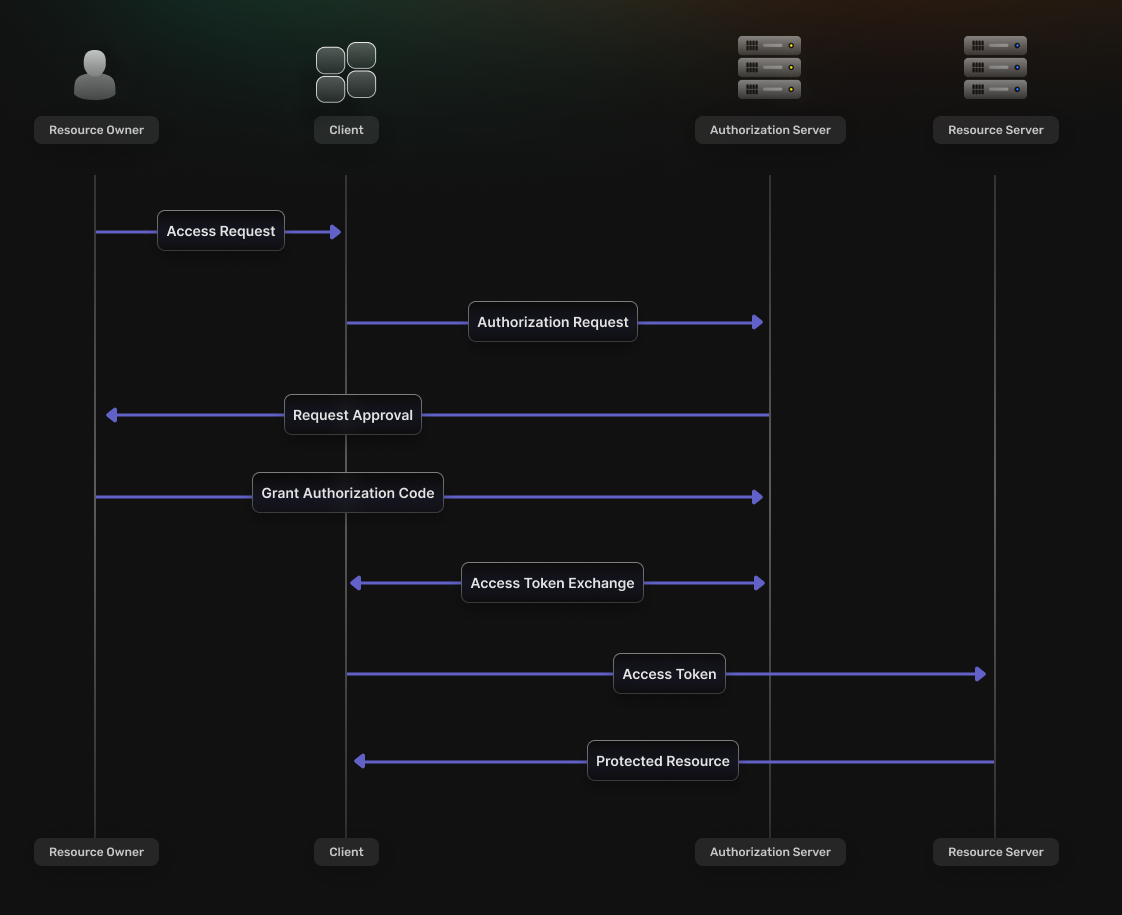 This flow is best suited for scenarios that involve **web applications**.
It consists of the following steps:
1. The **Client** redirects the **Resource Owner** to the **Authorization Server’s** authorization endpoint.
2. If the **Resource Owner** grants permission, the **Authorization Server** redirects their browser back to the specified **Redirect URI** and includes an **Authorization Code** as a query parameter.
3. The **Client** then sends a request to the **Authorization Server**’s token endpoint, including the **Authorization Code**.
4. The **Authorization Server** verifies the information sent by the **Client** and, if valid, issues an **OAuth2 Access Token**.
5. The token can make requests to the **Resource Server** to access the protected resources on behalf of the **Resource Owner**.
##### Authorization code
An **Authorization Code** is a short-lived code that the [**Authorization Server**](#authorization-server) provides to the [**Client**](#client), via a **Redirect URI**, after authorization approval.
This code then gets exchanged for an [**OAuth2 Access Token**](#oauth2-access-token).
The **Authorization Code** flow enhances security by keeping tokens out of the user-agent and letting the [**Client**](#client) manage the backend communication with the [**Authorization Server**](#authorization-server).
##### Proof key for code exchange (PKCE)
To prevent cross-site request forgery (CSRF) and code injection attacks, the **Authorization Code flow** can use [**PKCE**](https://oauth.net/2/pkce/).
At the beginning of the authentication flow the **Client** generates a random string called a *code verifier*.
This ensures that, even if the **Authorization Code** gets intercepted, it cannot be exchanged for a token without also including the initial code.
#### [Client credentials](https://oauth.net/2/grant-types/client-credentials/)
This flow is best suited for scenarios that involve **web applications**.
It consists of the following steps:
1. The **Client** redirects the **Resource Owner** to the **Authorization Server’s** authorization endpoint.
2. If the **Resource Owner** grants permission, the **Authorization Server** redirects their browser back to the specified **Redirect URI** and includes an **Authorization Code** as a query parameter.
3. The **Client** then sends a request to the **Authorization Server**’s token endpoint, including the **Authorization Code**.
4. The **Authorization Server** verifies the information sent by the **Client** and, if valid, issues an **OAuth2 Access Token**.
5. The token can make requests to the **Resource Server** to access the protected resources on behalf of the **Resource Owner**.
##### Authorization code
An **Authorization Code** is a short-lived code that the [**Authorization Server**](#authorization-server) provides to the [**Client**](#client), via a **Redirect URI**, after authorization approval.
This code then gets exchanged for an [**OAuth2 Access Token**](#oauth2-access-token).
The **Authorization Code** flow enhances security by keeping tokens out of the user-agent and letting the [**Client**](#client) manage the backend communication with the [**Authorization Server**](#authorization-server).
##### Proof key for code exchange (PKCE)
To prevent cross-site request forgery (CSRF) and code injection attacks, the **Authorization Code flow** can use [**PKCE**](https://oauth.net/2/pkce/).
At the beginning of the authentication flow the **Client** generates a random string called a *code verifier*.
This ensures that, even if the **Authorization Code** gets intercepted, it cannot be exchanged for a token without also including the initial code.
#### [Client credentials](https://oauth.net/2/grant-types/client-credentials/)
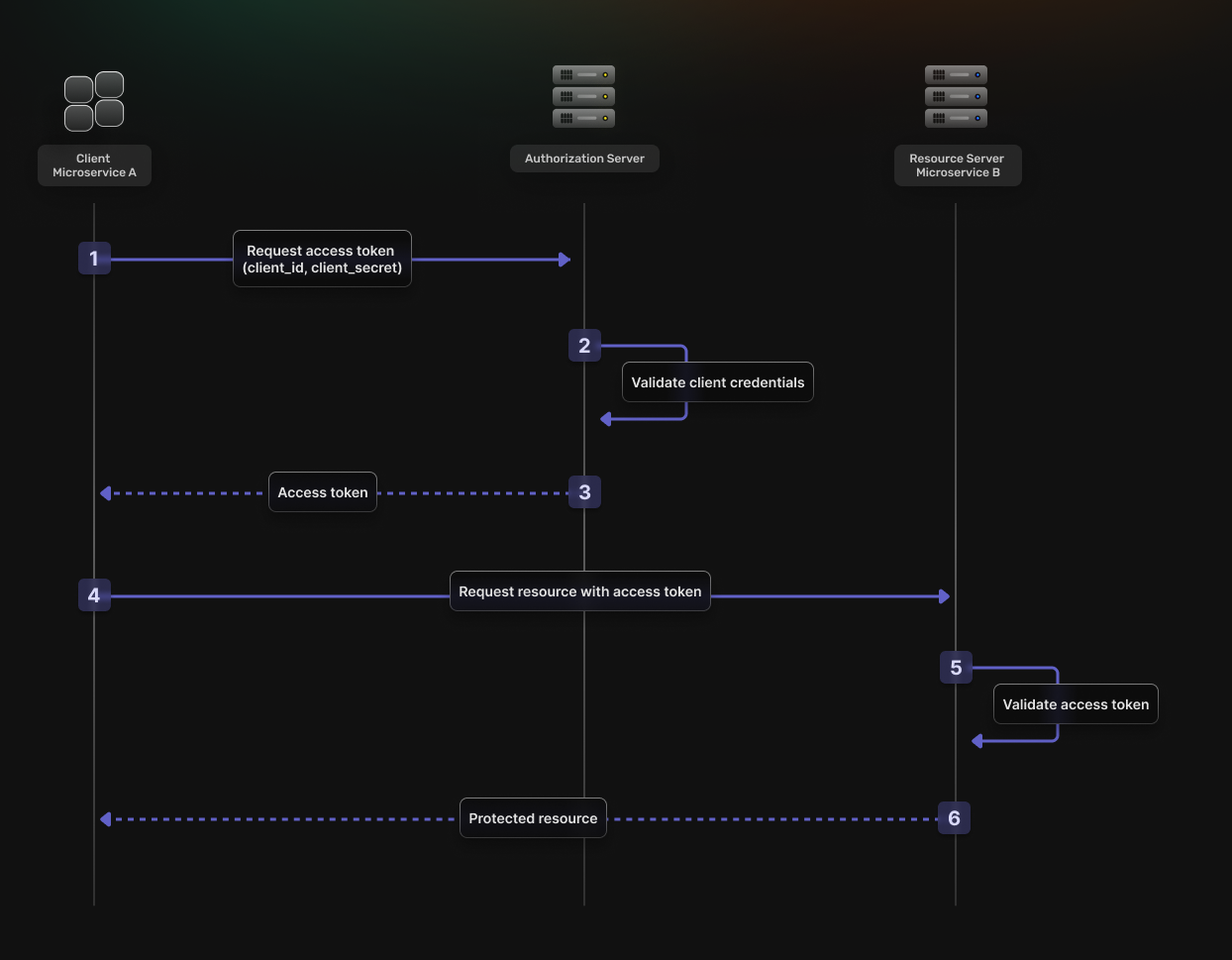 This flow is best suited for **machine-to-machine** (M2M) interactions where there is no end-user.
It consists of the following steps:
1. The **Client** authenticates with the **Authorization Server** using its own credentials.
2. The **Authorization Server** verifies the credentials.
3. The **Authorization Server** returns an **OAuth2 Access Token**.
4. The **Client** uses the **OAuth2 Access Token** to access protected resources.
5. The **Resource Server** validates the **OAuth2 Access Token**.
6. If the validation is successful, the **Resource Server** returns the requested resources.
This flow is best suited for **machine-to-machine** (M2M) interactions where there is no end-user.
It consists of the following steps:
1. The **Client** authenticates with the **Authorization Server** using its own credentials.
2. The **Authorization Server** verifies the credentials.
3. The **Authorization Server** returns an **OAuth2 Access Token**.
4. The **Client** uses the **OAuth2 Access Token** to access protected resources.
5. The **Resource Server** validates the **OAuth2 Access Token**.
6. If the validation is successful, the **Resource Server** returns the requested resources.