File length: 5185
# Authentication - Passkeys - Important concepts
Source: https://supertokens.com/docs/authentication/passkeys/important-concepts
## Overview
Use this page to get a high-level overview of the key concepts involved in the WebAuthn documentation.
The reference goes over each term and describes how the **WebAuthn** flows work within **SuperTokens**.
## Terminology
### WebAuthn
Web Authentication, **WebAuthn**, is an open web standard that enables secure, passwordless authentication for web applications.
**WebAuthn** allows users to log in using biometrics, security keys, or device-based credentials, replacing traditional username and password combinations.
Under the hood, the standard relies on [asymmetric (public-key) cryptography](https://en.wikipedia.org/wiki/Public-key_cryptography) to confirm the identity of a user.
For a more detailed explanation of WebAuthn, you can refer to the [actual specification](https://www.w3.org/TR/webauthn/).
### Passkeys
A **passkey** is a type of credential that implements the WebAuthn standard.
It uses cryptographic keys that users can share across multiple devices.
This makes it convenient and recoverable in case of device loss.
Aside from the ease of use, passkeys are integrated into operating systems and browsers, and, support a wide range of devices.
### Additional terms
## Credentials
The technical term for the cryptographic key pairs used in **WebAuthn**.
They represent the raw cryptographic material and, unlike **passkeys**, are device-specific and not synced.
Additionally, sometimes, multiple credentials can be part of a single passkey.
:::info Note
This documentation uses **passkey** and **credential** interchangeably, even though subtle technical differences exist.
:::
## Authenticator
A device or software that implements the **WebAuthn** authentication. This can be:
- **Platform Authenticator**: Built-in biometric sensors like TouchID, FaceID, or Windows Hello.
- **Roaming Authenticator**: External security devices like YubiKeys or Google Titan keys.
## Registration
The process where a user registers their **authenticator** with your application. During this process:
1. The server generates a challenge for the **authenticator** to sign.
2. The **authenticator** creates a new credential.
3. The system saves the public key and any additional metadata for future authentication.
## Authentication
The process where a user proves their identity, using their **authenticator**, by responding to a **server challenge**.
Using their private key, they sign the **challenge** and then send the result to the server.
The server then verifies the signature with the stored public key.
## Attestation
**Attestation** represents information about the **authenticator device** itself.
You can use it to verify the authenticity and the security level of the **authenticator**.
## User verification
**User verification** is the method used to verify the user's presence. This can be:
- Biometric verification (fingerprint, face scan).
- `PIN` entry.
- Physical button press on a security key.
## Authentication flows
This section explains how each component communicates during different authentication flows.
### Login
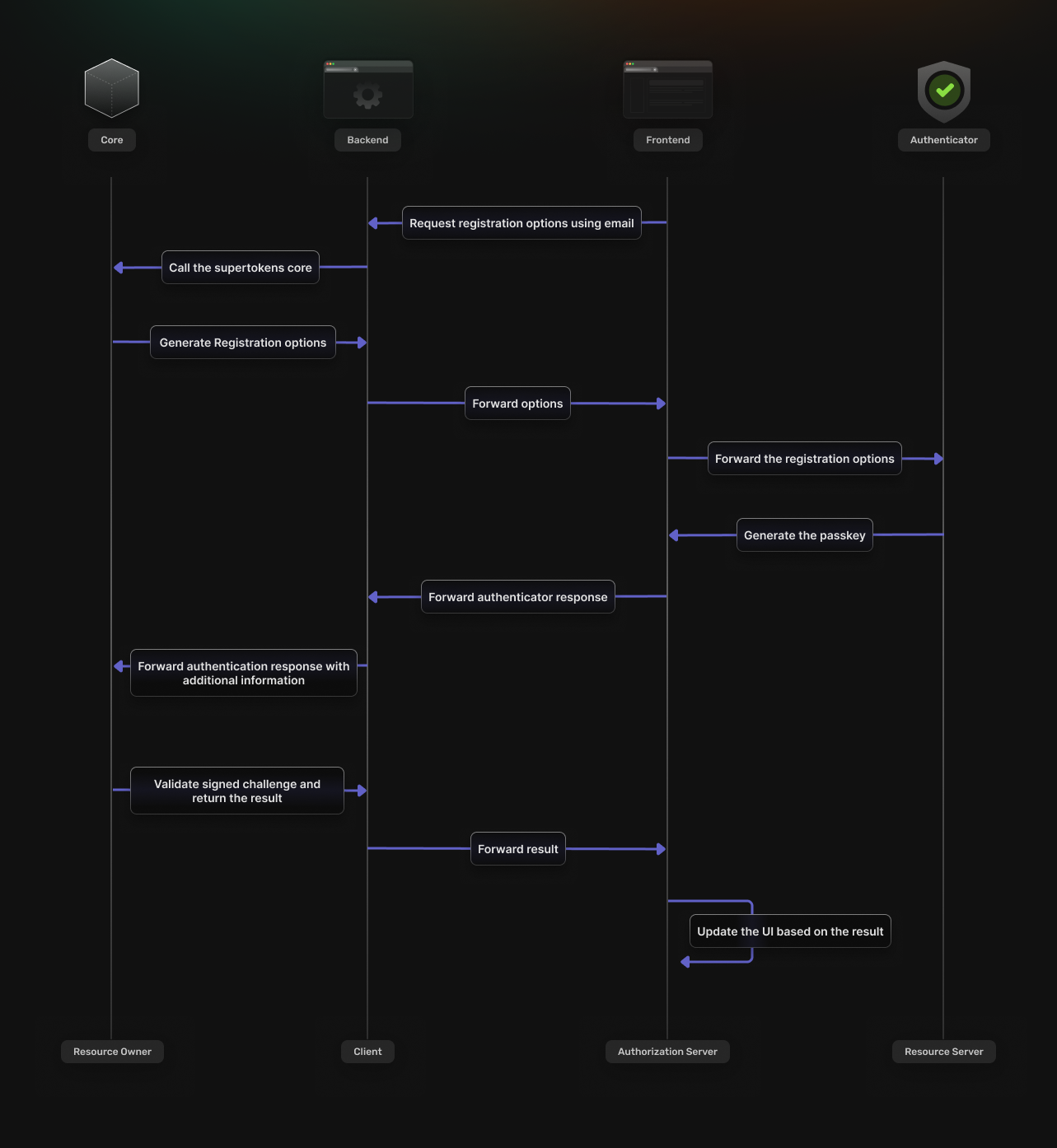
## The frontend SDK requests registration options from the backend.
The options are then returned based on the response from the **SuperTokens** core service.
## The **authenticator** uses the response to sign a challenge with your **passkey**.
## The result of the **authenticator** operation gets validated by the **SuperTokens** core service.
## The authentication UI updates, based on the result of the validation process.
### Sign up
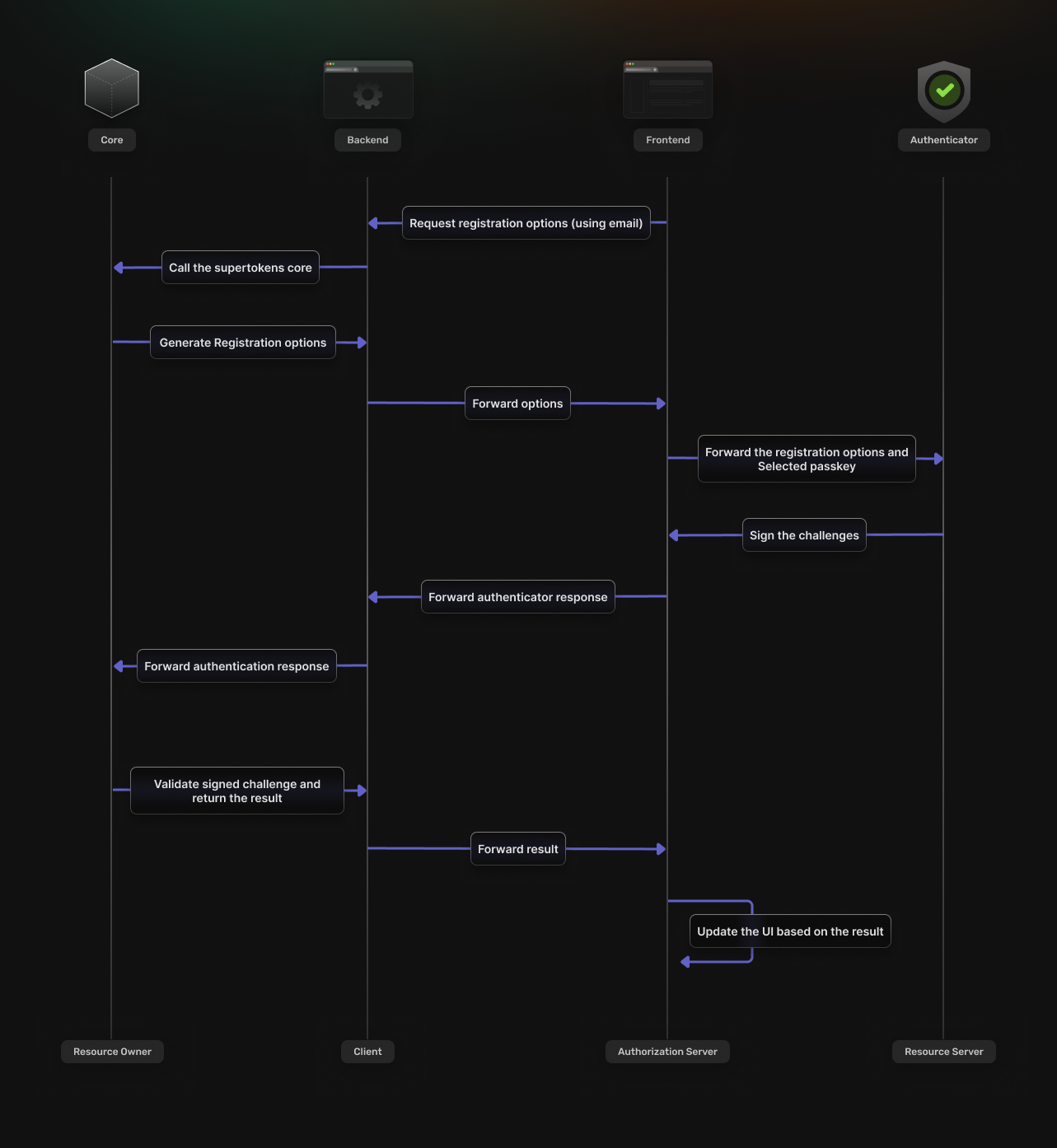
## The user enters their email address in frontend authentication UI
## The frontend SDK uses the email to request **registration** options from the backend.
The options are then returned based on the response from the **SuperTokens** core service.
## The **authenticator** uses the response to sign a **challenge** with your **passkey**.
## The result of the **authenticator** operation gets validated on by the **SuperTokens** core service.
## The authentication UI updates, based on the result of the validation process.
### Account recovery
Account recovery should use an email.
In it, the user receives a link that directs them to a page where they can register a new credential.
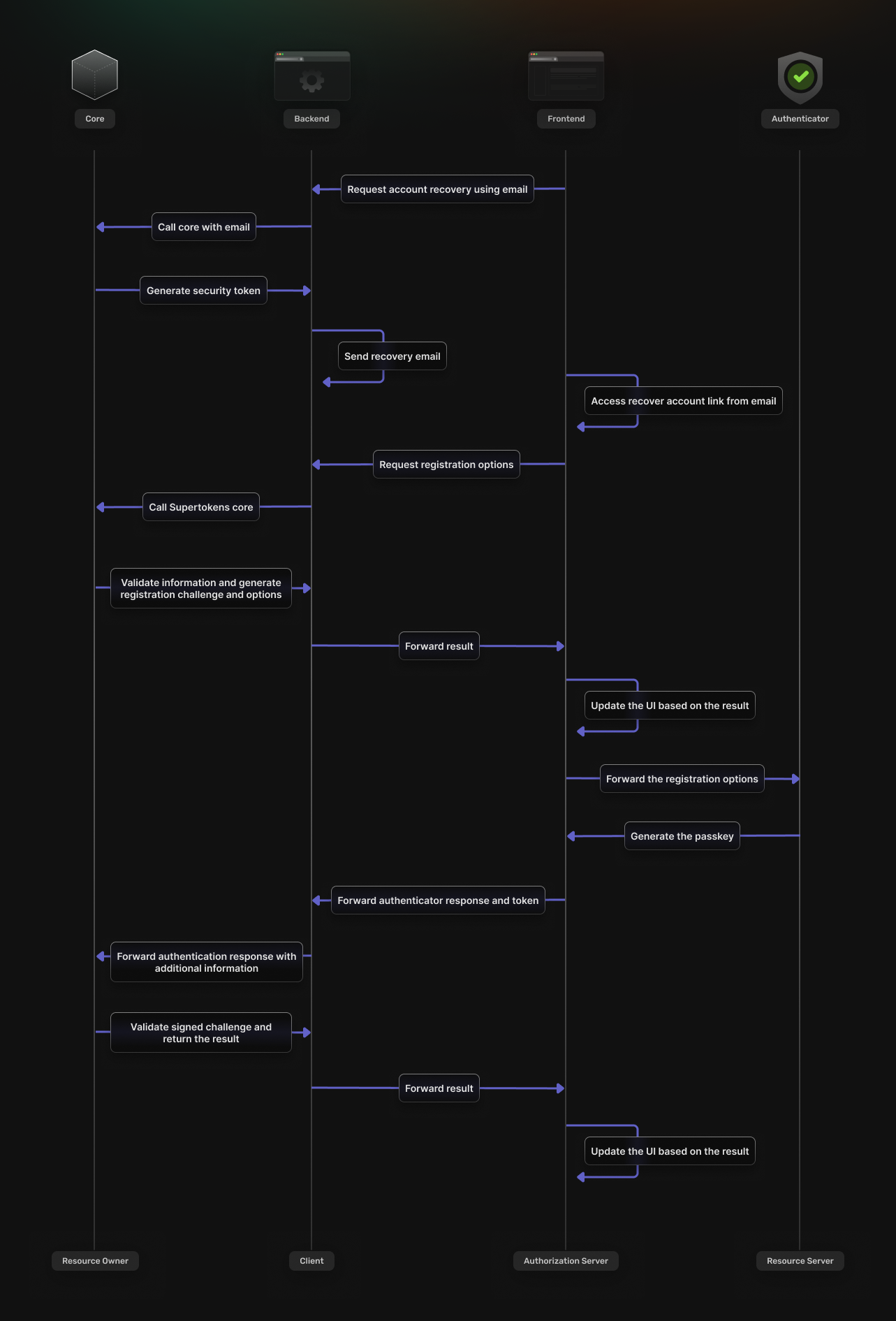
## The frontend initiates the recovery flow by communicating with the backend SDK
## The backend checks if the email exists and then sends a recovery email.
The email includes a security token obtained from the **SuperTokens** core.
## When the user accesses the recovery link, they get directed to the frontend application.
The security token gets validated by the backend SDK.
If successful, the SDK begins the process of registering a new credential.
From here, the flow matches the one described in the previous sections.